
Release Notes
2026 - Q3 preview
Preview of the 2026 Q3 release: floor maps and desk booking, native recurring reservations, product sustainability labels, a new analytics module, plus more.
Updated Jun 13, 2026
A preview of the work currently in flight for the next Gfacility release. Following our recent Q2 release, we have aligned with customers on the priorities for Q3. The focus is on reservations end to end: native recurring meetings, the mobile reservation experience, floor maps, setup and breakdown time, and richer availability rules. Alongside reservations we are finalising the financial rule engine so administrators can define their own pricing rules, promoting group permissions out of beta, opening up configuration translations and adding a first set of curated KPIs and dashboards.
Reservations
Mobile app for reservations
The mobile app is being extended so users can manage reservations on the go with the same feature set as the web. The booking form, availability checks, recurrence, services and check-in flows are all part of the scope.
Recurring reservations, native in Gfacility
Microsoft-origin recurring meetings already work today. We are adding native recurrence so users can create a series directly in Gfacility, with the usual frequency, interval and end-date or count, plus exceptions.
When Microsoft sync is enabled, each occurrence syncs to Microsoft as an individual event rather than a Microsoft series, so every occurrence keeps its own catering, services, check-in and status. Edits use the familiar scope picker: this occurrence, this and following, or the whole series. A reasonable limit on how far ahead a series can stretch (for example 12 months or 100 occurrences) keeps things manageable.
Setup and breakdown time
Rooms get a per-room setup and breakdown duration, with an optional per-booking override. The buffer counts as room-occupied time in availability checks, so adjacent bookings cannot collide with prep or cleanup. When the full buffer does not fit, the largest buffer that does fit is applied automatically and the actually applied value is shown on the booking. The room planner and signage render the buffer visually, separate from the meeting itself.
Signage release per reservation type
Each reservation type gets a setting that controls whether the booking auto-releases when no one checks in. Today every booking is released for no-show. With the new setting, blockade, maintenance and setup bookings can skip that auto-release entirely, so a planned blockade is not silently freed up halfway through. Existing blockade and maintenance types are switched off by default.
Availability rules per user group
Today only one set of availability rules can be defined per resource. In Q3 a resource can carry multiple rules, similar to how restriction rules work today. Each rule takes a list of groups, a maximum advance window in days, a minimum advance time in minutes and a maximum duration in minutes. The most restrictive rule that matches the booking user’s groups wins, with the “all groups” rule as the fallback. Booking create and update enforce the rule with a clear error message, for example “You can only book up to 5 days in advance”.
Reservation source and no-show
Two new fields on every booking lay the data behind the upcoming dashboards:
- Source, captured automatically based on where the booking was made: the web app, the mobile app, Outlook, Google, a room signage, a kiosk or an external integration.
- No-show, flagged automatically when a booking ends without anyone checking in. Reservation types that don’t require check-in (the new setting in the signage section) are skipped, and the grace period is configurable.
Microsoft add-in
The Microsoft add-in continues to work exactly as it does today. From the user’s point of view nothing changes in how rooms and services are booked from Outlook. Behind the scenes we are making a set of technical improvements to how the add-in is built and maintained, so it stays robust and easier to evolve. There is nothing to relearn and no change to the booking flow.
Floor maps and desk booking
A visual layer is coming for navigating buildings, rooms and desks, and Q3 introduces desk booking on top of it. The work spans configuration, availability logic, the booking form and desk booking itself. Detailed scope follows in a dedicated article; the headlines for the preview:
Floor map configuration per floor
Admins upload a floor map per floor, draw room zones directly on the map and place objects on top. Rooms are linked to their existing room records in Gfacility, so the visual layer reuses the same data. Desks are created as the floor map is laid out, since the concept itself is new; other objects (assets, service points, points of interest) link to existing records where they already exist. Labels, icons and colours are configurable; zoom, pan and full-screen editing are supported.
Availability on the map
Each mapped room and desk shows a live status based on the selected date and time:
- Green for available
- Red for occupied
- Blue when selected
Hover and click reveal room or desk details (capacity, layout, equipment, next booking) and the map respects existing booking rules, restrictions, approval flows and opening hours.
Floor map view in the booking form
A new “Floor map” view sits alongside the list and grid views in the booking form. Users can pick an available room by clicking a green tile, see why a red tile is busy, and have the booking form update automatically. Filters (capacity, location, floor, room type, equipment, layout) apply to both list and map and you can jump between the two without losing context.
Floor map kiosk
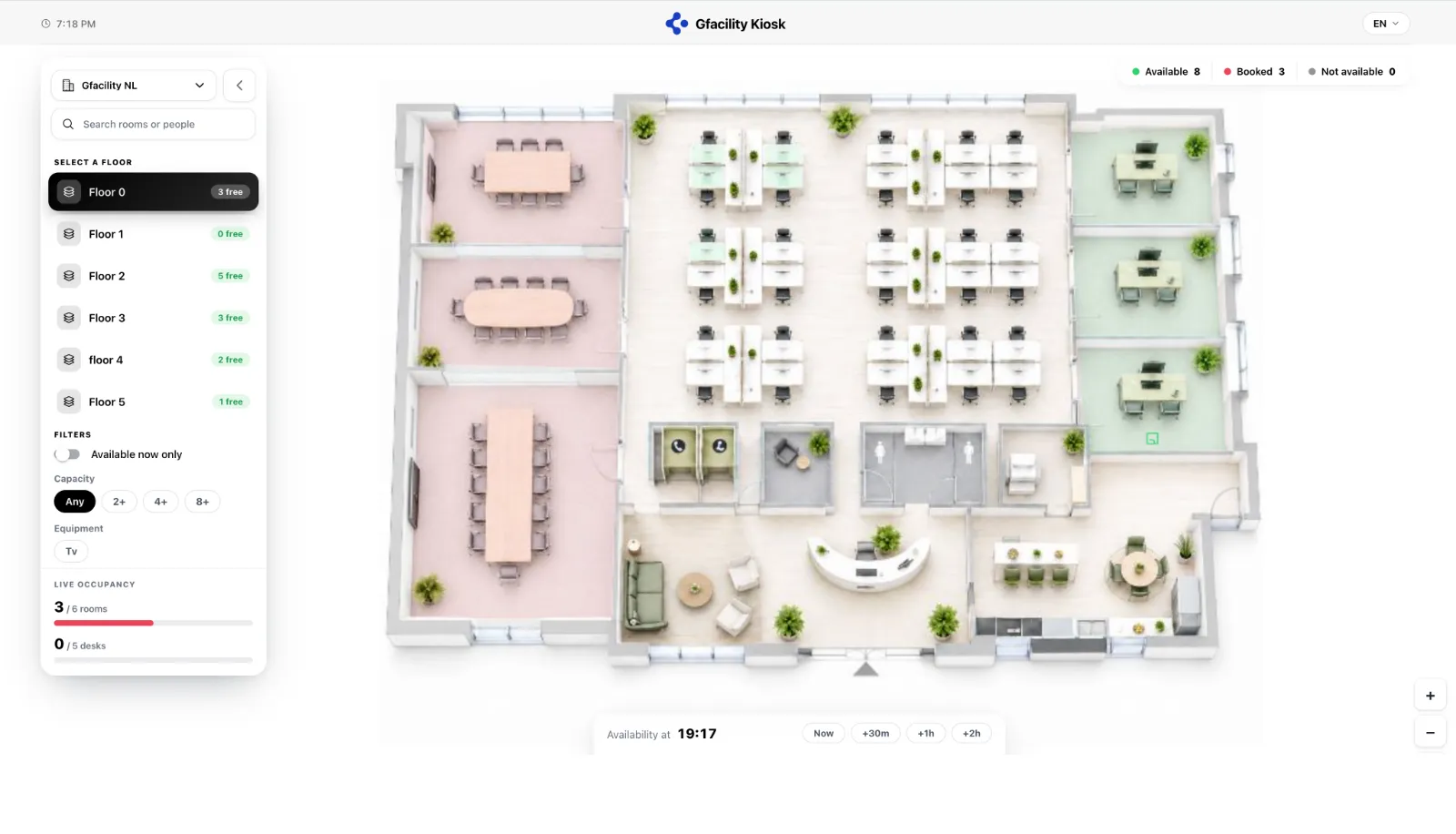
A wall-mounted kiosk brings the same floor map to the lobby and to every floor. It runs full screen on a tablet or display: pick a building and a floor, and the map shows every room and desk colour-coded live, available, booked or not available, with running totals at the top. Filters (available now, capacity, equipment) and a time slider (now, +30m, +1h, +2h) let anyone walking up check what is free at a glance and find their way around, without signing in.
Desk booking
Desk booking is introduced in Q3: an individual desk becomes a first-class bookable object that sits next to rooms in the booking flow. A desk carries a type (fixed, flex, focus), capacity, equipment (monitor, dock, chair) and a department, zone or neighborhood. Users reserve an individual desk for a full day or part of a day, straight from the floor map or the list view, with the same colour logic and the same booking rules that apply to rooms. Fixed desks can be assigned to a person, flex desks stay open for daily booking and focus spots are grabbed ad hoc, opening the door to neighborhood booking, team zones and occupancy insights.
Signage
Defect reporting from the signage
People in a room can flag an issue (broken AV, cleaning, climate) directly from the signage in a few seconds. They pick a category, give it a title, optionally add a description and urgency, and the ticket lands in the regular ticketing flow with the right team picking it up. No need to leave the room, no separate channel to manage.
Finance
Financial rules you define yourself
Q3 closes the financial rule engine so administrators can set up the pricing rules they actually need, not just the handful the system knew about. Each rule pairs a condition with an amount in plain “if X then Y” terms, and the same engine targets rooms, services and catering.
A few of the rules customers have asked for:
- Cancellation more than 10 hours before the meeting: 50% of the cost.
- Cancellation under 2 hours before the meeting: 100% of the cost.
- This type of meeting (for example a customer event) is invoiced at a premium rate compared to internal meetings.
- Members of group X pay a reduced rate; group Y pays the full rate; group Z is free.
- This room or service has a different price on weekends than on weekdays.
The rules feed into the existing invoicing flow, so the right amount lands on the right invoice without manual reconciliation. The admin screen is finalised in parallel so you can author and tweak rules directly inside the product.
Products
Sustainability labels on products
The product module gains a set of sustainability labels, so the catalogue carries more than a name and a price. A product can now be tagged as vegan, vegetarian, local or seasonal, and can carry a CO2 score and an eco score. The labels appear wherever products are picked, such as the booking form and the catering flow, so users see the impact of what they order and can make a more sustainability-aware choice.
Steer the catalogue toward sustainable choices
Administrators gain control over the order in which products are shown. You can surface the lower-impact options first, so that by default users are nudged toward the more sustainable outcome. The ordering is optional: leave it off and the catalogue behaves as it does today.
Configuration and templates
Group permissions: now generally available
The group-permission comparison overview was released as beta in Q2. Based on customer feedback it now exits beta and becomes generally available in Q3, with no further breaking changes planned.
New organisation-scoped role
Today a user has a fairly binary choice on any workload: either they sit on a ticket or task as Creator, Assigned to or Watcher (three explicit, narrow roles), or they have No role and the access that comes with it kicks in across everything inside their organisation scope. The jump from “nothing” to “everything” is too wide for most customers.
Q3 introduces an intermediate layer: a configurable organisation-scoped role. Admins define what the role is allowed to do (read, edit, close, reassign, adjust financials, …) and the role binds itself to the user’s profile. Two profile fields drive the binding:
- Primary organisation: the user’s main organisation. The role applies inside that organisation by default.
- Organisations with access: the list of additional organisations the user can reach. The role can optionally extend there or stay scoped to the primary.
The role applies product-wide: it covers every object that carries permissions today - reservations, assets, CIs, tickets, tasks and services - from a single configuration.
The new role lives alongside the existing Creator / Assigned to / Watcher / No role layer; it does not replace it. Typical use case: a service coordinator who needs to pick up and reassign any ticket inside one organisation, but should stay out of other organisations in the tenant. Existing No-role users keep working as today; the new role is opt-in and granted per group.
Translatable configuration data
Configuration data becomes translatable into the eight supported languages (English, French, German, Spanish, Italian, Dutch, Swedish and Portuguese). The first wave covers Products and the building blocks (with the exception of notification rules). Translations are customer-provided, we do not auto-translate; the UI exposes a translation flow per object.
Compare templates side by side
A new comparison view lets you put templates next to each other and see at a glance where they differ. It works for ticket, asset, CI and knowledge-base templates, so when you maintain several variants of the same template you can spot the differences in fields, defaults and settings in seconds instead of opening each one in turn.
Navigation
Workspaces and overviews in one flow
Getting to the right view used to take two separate steps: first you pick a workspace, then you find and open the overview you want inside it, and the path between the two was not always obvious. In Q3 these merge into a single flow. From one “manage overviews” panel you pick a workspace on the left and tick the overviews you want pinned as tabs on the right, drag to reorder them, and create a new workspace or overview on the spot. Configuring what you see and navigating to it now happen in the same place, so the views you work with every day stay one click away.
Feedback and announcements
NPS feedback prompt
To hear from users more often, a lightweight NPS prompt appears at the top of the app, with inline 0-10 scoring and an optional comment, so people can rate Gfacility without leaving what they were doing. Every client is included by default; organizations that would rather not run it can opt out. The score is captured so satisfaction can be tracked over time alongside the operational KPIs.
Announcement banners
A reusable announcement banner lets you surface important information that affects how Gfacility is used, such as planned maintenance or a change everyone needs to know about. Banners stack but show one announcement at a time, so the message stays clear and never competes with itself.
AI
We continue to optimise the AI assistant that already lives inside Gfacility. Three additions for Q3:
Bring your own LLM
Customers can onboard multiple large-language models and pick which one to route a given workload to. Use a fast, cheap model for routine summaries and a heavier model for the questions that warrant it. Models are configured per environment.
Plan mode
A new plan mode keeps the user in the driver’s seat for multi-step work. Ask “analyse these 10 tickets and propose next steps”, the assistant returns a plan with the proposed action per ticket, you approve or tweak the items you want, and the assistant executes only what you confirmed. No more all-or-nothing.
AI on configuration
The assistant gains the ability to help solve and apply configuration changes, not just operational ones. Ask “set up a workflow for parking-card requests with approval by Facility”, the assistant suggests the workflow shape, you review, and it carries out the changes against your environment.
Insights and dashboards
Q3 introduces a curated set of KPIs and dashboards across the operational modules: tickets, tasks, bookings, visitors, assets and CIs. Rather than a blank-canvas chart builder, the focus is on the questions managers actually ask. A few of the KPIs landing in this release:
- Tickets: open backlog by classification, time to first response, lead time to closure, ageing of the oldest tickets, SLA breach rate.
- Tasks: open tasks per assignee or workgroup, overdue tasks, average time to completion.
- Bookings: weekly room occupancy (see below), no-show rate per room or building, share of bookings by source (web, mobile, Outlook).
- Visitors: visitors per day, peak hours, average dwell time, recurring visitor share.
- Assets and CIs: assets approaching end of life, contracts expiring this quarter, CIs with the most open incidents.
- Helpdesk depth: reopen rate, first-contact resolution, cost per ticket, planned versus reactive work, a mean-time-between-failures proxy and room utilization.
- Desks: desk no-show, pre-registered and recurring desk bookings, and cancellations.
- Catering: order cost and margin, plus a sustainability roll-up across the product labels above.
Two foundations sit under these numbers. A duration layer reads the change log to measure time-in-status across tickets, tasks and finance, including aging metrics, so “how long did this sit waiting” becomes a reportable figure. And a master benchmark database lets you compare your results against industry KPI benchmarks, mark your own custom KPIs and choose what to compare against: a previous period, another team or building, or the benchmark.