
When
Pick the record type and the moment: created, updated, a status change, or on a schedule. Rules can also reach related records, so a change on a ticket can act on its tasks or its whole subtree.
Build rules that watch your tickets, tasks, bookings, visitors and assets, then route, update, notify or escalate on their own. No scripts, no separate automation tool, no developer in the loop.
Linked issues12 duplicates
All closedCascade message
Root cause
Follow-up actions
SLA
Major incident SLA
Details
Pick the record type and the moment: created, updated, a status change, or on a schedule. Rules can also reach related records, so a change on a ticket can act on its tasks or its whole subtree.
Stack conditions in groups with and or or, on any field the record actually has, including custom fields. The builder shows what you are matching in plain language.
Assign a workgroup, change a status, update fields, add a comment, send an email, create a task, post a bot message, call a webhook, or hand the record to AI. Several actions per rule, in order.
Run any rule against a real record first and read back exactly what it would do, step by step, before it ever touches live work.
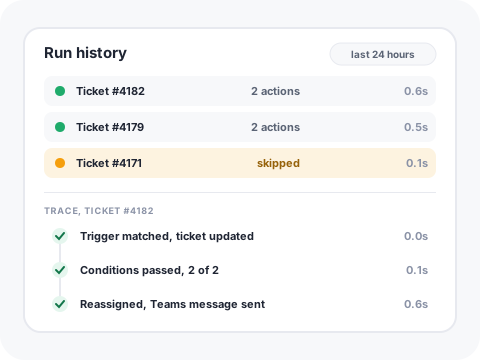
Every run is logged with the record it touched, which conditions passed, which actions fired and how long it took. When a rule does something unexpected, you can see why instead of guessing.
Not everything is event driven. Run a rule on a schedule to chase stale tickets, close resolved work, or flag contracts coming up for renewal.
Push to another system with a request body you control, so the tool on the other end gets the shape it expects.
Hand a record to the AI as one step in the rule, for triage, classification or a summary, then keep the deterministic steps around it. Automation and AI in one flow, not two products.
No. Triggers, conditions and actions are all configured in the interface. A webhook lets you hand off to another system when you want to, but nothing about building a rule requires code.
Automation has its own read, create, update and delete permissions, so you can let a service owner read the rules while only a small group changes them.
Rules are scoped to the record type and the moment you pick, and every run is recorded. For records that hang under a booking you can also limit a rule to fire once per parent.
Yes. Depending on the record type a rule can target the record itself, its parent, its children, its whole subtree or its tasks, so one change can update everything that hangs off it.
Book a discovery call and we will build one of your own rules during the session.
Schedule discovery call