Overviews and filters
Quickly find the relevant information through user-friendly overviews with advanced filtering capabilities.
Welcome visitors with ease and professionalism. The smart visitor management kiosk streamlines registration, eases reception workload, and creates a welcoming experience. Less wait, more personal attention - make a lasting impression.
Reception kiosk, Breda
 14:0114:01
Check in to let your host know you have arrived
Touchless, GDPR-proof
Hold your QR code in front of the reader
The code is in your invitation email
Code recognised
Your host knows you have arrived.
Register at the desk
Your host is notified as soon as you are checked in.
House rules
Please read these before you go in.
Accepted 14:02, stored with the visit.
You are checked in
Thank you. Take a seat, Peter Klein will come and meet you.
This closing message is set per kiosk.
Check out
Scan the QR code from your invitation, or use the email address you were invited on.
Thanks for your visit
Checked out at 16:12, recorded on the visit.
No signature: the time is recorded on the visit.
A demo, nothing is stored. Each kiosk runs in one language, set by the administrator.
Why a digital reception
A tablet at reception does four things at once for the front desk. Each one is worked out further down this page.
Create an unforgettable first impression
The first screen your guest sees carries your logo, your colours and your own welcome.
The screen→Gather additional information or have tests taken
You decide what the screen asks: extra details, house rules or a statement the guest accepts before the check-in completes.
The sign-in fields→Hospitable reception without staff
Guests sign in, print their badge and check out, even when nobody is sitting at the desk.
Check-out→Let suppliers register themselves
A supplier or a courier registers at the door, so a delivery is recorded too.
Signing in at the door→The screen at the desk
Five choices you make once, and after that a visitor is welcomed, signed in and gone again without reception having to step in.
In your house style
The first thing a guest sees is your logo, your colours and your welcome, not someone else's software.
Everyone signs in
The invited guest with a QR code, the unannounced visitor, and the supplier or courier at the door.
A badge you designed
Your guest walks your building all day with your house style on their chest.
Self check-out
A guest leaves without hunting for anyone, so the list of who is in the building stays right.
And the numbers
Who is in the building, which passes are still out, and what a manned desk costs.
The screen in your lobby
The first thing a guest sees is the screen at your reception, so it shows your logo, your colours and your own words instead of someone else's software. And no check-in completes until the house rules have been accepted, so everyone who walks in has agreed to the same conditions.
Set in Gfacility
You manage all of this from your desk, and a saved change is on the screen in the lobby straight away.
The thank-you screen
Thanks, your host knows you have arrived. Take a seat, someone will come and get you.
House rules accepted at 09:14
The tablet in the lobby
Welcome to Breda
Let us know you are here and we will tell your host.
Three ways to sign in
Not everyone who walks in is an invited guest, and today each of them interrupts somebody at reception. All three sign in at the same screen instead, and what they fill in is a real visit in Gfacility rather than a line in a book at the desk.
The invited guest
Scans the QR code from the invitation and is checked in before the coat is off.
The unannounced visitor
Fills in the details you asked for, while reception carries on with its own work.
The supplier or courier
Signs in the same way at the door, with a purpose like Delivery, so a drop-off is on the record too.
Which details are asked for, and which of them are mandatory, is yours to set: an extra detail or a declaration to accept fits into the same sign-in.
What signing in creates
Nothing is kept in a separate list at the door. A sign-in creates a visit in Gfacility, so reception, the host and the reporting all read the same visit.
The badge
A guest carries your badge around the building all day, so it is worth looking like your organisation rather than a strip of paper out of a machine. You design it once, and the kiosk prints it while the guest is still standing there.
1Your own design
Badge template
Emma Clarke
Host Peter Klein · 10:00
You design this badge yourself, and the fields on it are filled per visitor as it prints.
2At the kiosk
Kiosk, main entrance
Guest checked in
Printing the badge
Prints over Wi-Fi, USB or Bluetooth to Brother QL-820NWB.
A kiosk prints with its own badge template, so the entrance decides what the badge looks like, not the meeting it belongs to.
3At reception
Visitors today
| Visitor | Host | Badge number | Badge |
|---|---|---|---|
| Emma Clarke | Peter Klein | V-0413 | Reprint |
| Daniel Hughes | Peter Klein | V-0414 | Reprint |
| Priya Shah | Peter Klein | V-0415 | Reprint |
A reprint is checked per visitor, so a colleague who may not see a booking does not get that badge and the rest still print.
The badge is a printed label, not an access credential: nothing on it is encoded and it opens no door or turnstile.
Check-out
A guest who walks out of the front door without telling anyone stays on your list for the rest of the day. At the kiosk they check themselves out in one move, and the visit records the time.
Reception kiosk, Druivenstraat 47
Check-out on
1At the kiosk
Check out
Scan the QR code from your invitation, or type the email address you were invited on.
Scan the QR code
The code from the invitation email
Or use your email address
Email address
2On the visit
Thanks for your visit
Checked out at 16:12, recorded on the visit.
3At reception
Visitors today
Druivenstraat 47
The list of who is in the building stays right all day, which is exactly what an evacuation list depends on.
Check-out stays optional per kiosk. A reception that does not want it leaves it off, and the kiosk refuses check-out altogether.
The numbers
Everything recorded at the entrance adds up to two things: a picture of who is in your building right now, and an entrance that no longer has to be staffed all day to get it.
Visitor overview
Head office Breda, today
In the building now
14
Follows from the check-ins and check-outs at the kiosk and at the desk, so the list is right at the moment you need it.
Badges not handed back
3
Every visitor record keeps whether the badge came back, so reception knows which ones are still out.
Visits today
28
Announced visits and sign-ins at the door together, sliceable per building and per day in the reporting.
Illustrative figures from a demo tenant. On your own board these are your visits.
A worked example rather than a price list. Put the two next to each other and the difference is in what has to be covered, not in what a visitor gets.
Manned reception
€ 45,000-55,000
employer costs per FTE per year, indicative
Digital reception
One screen per entrance
signing in, checking out and the badge, without the desk
The amounts are indicative and differ per organisation: opening hours, salary scale, region and the number of entrances all move the figure. Treat them as an order of magnitude for your own sum, not as a quote.
One link in the chain
The screen at the door is one step. Around it sits the whole visit: the invitation, what the guest fills in beforehand, the message to the host and what all of it reports afterwards.
The invitation
The host plans a meeting and the guest gets an invitation by email, with the QR code that starts the check-in.
The guest fills in the rest
In the guest portal the visitor completes their own details before they travel, so nothing has to be typed at the door.
Kiosk: check in and badge
The QR code or a sign-in on the screen, the house rules accepted, and the badge printed while the guest is still standing there.
You are here
The host is notified
The host gets a message that their guest has arrived, so nobody has to go looking for them.
Reporting
Every visit lands in the visitor list and in the reporting: who is in the building, and what the arrivals look like over time.
Gfacility brings your workplace together. Our all-in-one platform connects room bookings, attendees, visitors, and catering in one smooth flow - so meetings run effortlessly and everyone stays focused.
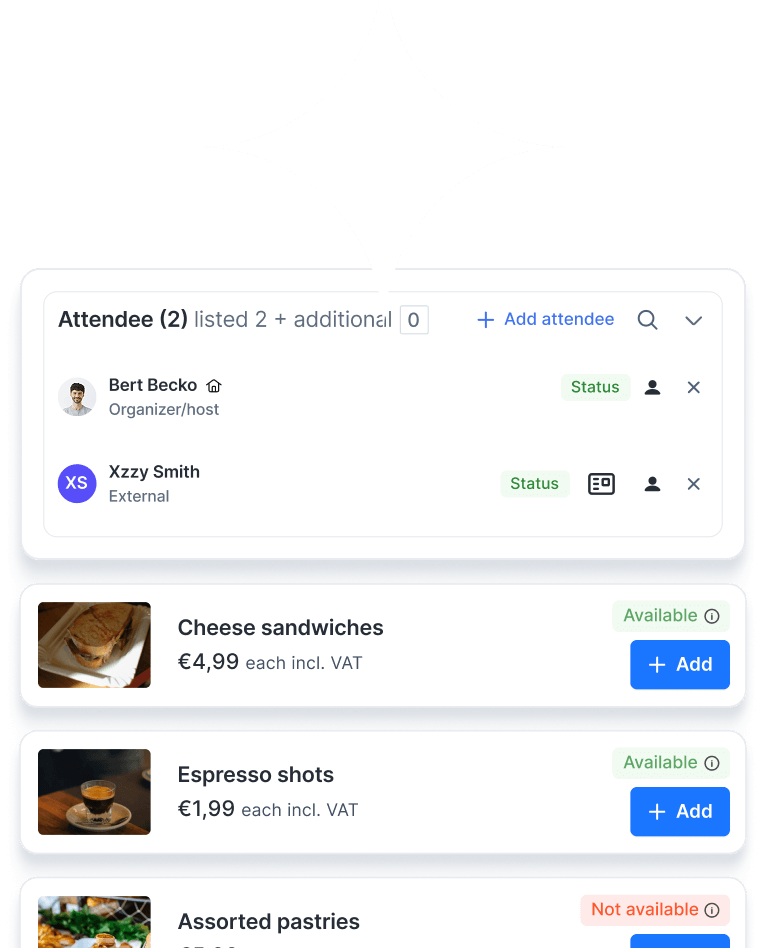
Quickly find the relevant information through user-friendly overviews with advanced filtering capabilities.
Receive timely notifications for important updates, tasks and reservations.
Automate (approval) processes and streamline tasks with customised tailored workflows.
Attractive catalogue with detailed room information and flexible rules to control who can book which rooms, and when.
Easy communication via email, with all correspondence automatically linked to the booking space.
Get valuable insights from edetailed analyses and flexible reporting.
Work anywhere with the convenient mobile application, designed for maximum flexibility.
Collect feedback and provide insightful ratings to monitor quality.
Create and print customised visitor badges for a professional and personalised welcome.
Google Calendar plug-in and user integrations.

Microsoft Outlook plug-in and user integrations.
Adjustable release times and extension options.
Seamlessly connect with building access control and parking management systems to automate entry permissions and access to parking.
Automatically delete visitor data after a set retention period to ensure privacy compliance and data security.
Send guests a simple pre-registration form before their visit to capture details, preferences, and any required documents in advance.
Enable visitors to check in using their own smartphone - no physical contact required.
Access a real-time list of all visitors on site to ensure safety during evacuations.
Manage visitor flows and reporting across multiple office sites from a single dashboard.
A visitor management kiosk is a self-service check-in station that automates the arrival process for guests, contractors, and deliveries. Instead of manual sign-in, visitors use a touchscreen or QR code to register, print a badge, and notify their host automatically.
It shortens queues, eliminates paperwork, and ensures a smooth, professional welcome. Guests can check in within seconds, receive clear instructions, and feel attended to, even without a staffed reception desk.
Yes. Manage all your kiosks from a single dashboard, whether you have one office or dozens of sites worldwide.
Yes. You can set up different workflows for contractors, VIPs, deliveries, or interview candidates, each with its own sign-in requirements.
Absolutely. The kiosk connects with access control systems, parking management, Microsoft Outlook, Google Calendar, and other workplace tools for a seamless visitor journey.
Yes. You can add your logo, brand colours, and welcome messages to create a fully branded visitor experience.
Yes. The visitor kiosk system is fully equipped for an unmanned reception. It handles check-in, badge printing, host notifications, and access control, ensuring a welcoming experience even without on-site staff.
Yes. The system automates data retention policies, deleting visitor information after a set period and storing all data securely.

Booking a meeting room shouldn’t feel like a project on its own. With Gfacility, you skip the email chains, avoid double bookings, and make sure every meeting has the right space, people, and setup - without the usual hassle.
Schedule a demo