
Lease and company cars
Contract term, contracted mileage, the fuel or charge card and the driver it is assigned to, whoever the lessor is. Two leasing companies still make one register.
One register for everything your organisation drives, rides and lifts, with its documents, its contract and the next date that expires. Cars and vans sit next to forklifts, trailers and e-bikes, and every deadline raises a job before it turns into a cost.
Fleet & equipment
Fleet
| Asset | Driver / location | Reading | Next due |
|---|---|---|---|
| Service van, Cargo van L2H2 | Peter Klein | 84,320 km | MOT in 21 daysPlanned |
| 8-TKS-19Lease car, Electric compact SUV | Anne Vos | 41,870 km | Lease ends in 4 months |
| HT-07Forklift, Electric, 1.6 t | Warehouse A | 2,140 h | Statutory inspection in 6 weeks |
| VN-233-AService van, Panel van L3H2 | Tom Bakker | 127,540 km | Service overdue by 900 km |
| EB-114E-bike, Cargo e-bike | Shared pool | 3,180 km | Service in 6 months |
Coming up
Every date is watched by the same rules engine that runs your tickets and work orders.
Who has what, until when
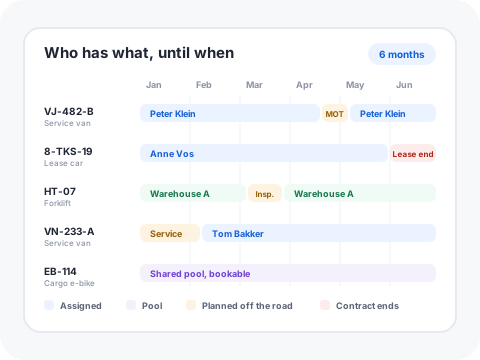
Assignments, planned maintenance and contract ends on one axis, so a van is never promised during the week it is in the garage.
Assets in fleet
Cost / asset / month
Inspections in date
Downtime days / month
Cost per category
Expiries, next 12 months
VJ-482-B21d
Service van
Documents
Open jobs
Work order WO-2041 created and planned. The van is booked out for that morning, so nobody schedules a job on it.
Illustrative data. Assets, inspection dates, documents and dashboards are configurable in the product.
Most facility teams do not run a fleet of one kind. They run a handful of lease cars, a few service vans, some equipment in the warehouse and a couple of bikes, spread over four systems and one spreadsheet.
Every asset gets a record: registration or asset tag, make and model, ownership, cost centre, the person or location it sits with, and the documents that prove it is road or floor legal. The record keeps its history, so the damage from two years ago, the garage that fixed it and the invoice that followed are still there when the lease ends or the machine is sold. Nothing depends on the one colleague who knew where the folder was.
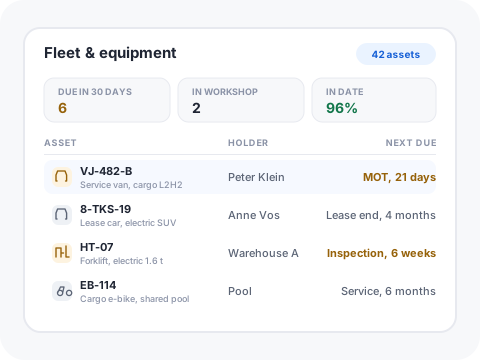
Vehicles measured in kilometres and equipment measured in running hours live side by side, each with the fields that class actually needs. You stop maintaining one tab per category.
Registration certificate, insurance policy, lease contract, inspection report and damage photos are attached to the record. The person answering a question at four in the afternoon does not have to be granted access to a drive first.
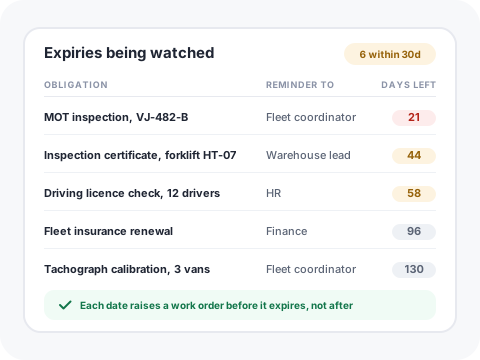
Inspection, insurance, certificate and contract dates are watched by the same rules engine that runs your tickets. The reminder lands with a named owner while there is still time to act on it.
Damage, a warning light or a failed inspection turns into a work order with an owner, a vendor and a cost, in the same queue as a leaking roof. The vehicle is booked out for the morning, so nobody schedules a job on it.
Maintenance, tyres, damage excess, fines and subscriptions post against the asset, so total cost per vehicle over a period is a report rather than an evening of reconciliation.
Who drove what and when, which licence categories they hold and when those expire. When a penalty notice arrives at the registration holder, the assignment history tells you who was behind the wheel that day.
Somebody orders from the catalogue, a service van, a pool car, an e-bike, and the request already asks the questions that decide it: site, cost centre, expected mileage, start date. It routes to fleet and to the budget holder instead of sitting in an inbox.
The approver, the timestamp and the time it took are recorded on the request. Once approved, the asset record, the driver assignment and the order to the leasing company all follow from that same request, so nothing is retyped and nothing is invented.
Odometer, damage, keys, charge card, winter set and accessories are ticked off with photos whenever a vehicle changes hands. The next argument about a scratch has a dated record behind it instead of two memories.
Every asset class carries its own inspection schedule and checklist, so the yearly forklift inspection and the van's service are generated, assigned and closed like any other planned job. Nobody has to remember to raise them.
A damage report captures the photos, the excess, the insurer reference and who was driving at the time, then becomes the repair work order with the garage. The claim and the repair stop living in two different systems.
The return workflow runs the return inspection, holds contracted mileage against the real reading, lists the recharges you can still do something about, and blocks the fuel card on the day the vehicle goes back.
Four numbers a facility manager gets asked for, each one a tile you can point at rather than a figure you assemble the night before.
The share of the fleet whose statutory inspections and certificates are current, instead of a best guess.
In Gfacility·The inspections in date tile on the fleet dashboard, with the expiring list behind it.
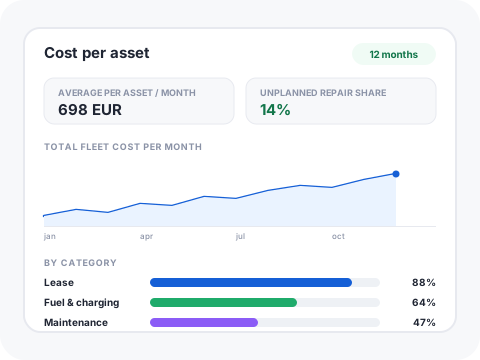
What each vehicle or machine actually costs per month once maintenance, tyres, damage and fines are included.
In Gfacility·The cost per asset per month tile, broken out by lease, energy, maintenance, tyres and damage.
How much lands on your desk this month, so the workload is planned rather than discovered.
In Gfacility·The expiries over the next 12 months chart, with the current month broken out.
Days a vehicle or machine was off the road or off the floor, and whether it was planned maintenance or a surprise.
In Gfacility·The downtime days per month tile, split by planned and unplanned work orders.
A damaged van is a job with an owner, a vendor, a cost and an SLA. That module exists, with your technicians and suppliers already in it. Fleet reuses it rather than adding a second place where jobs live.
A lease is a contract with an end date, a notice period and a supplier, exactly like your cleaning contract. It sits in the same register, with the same renewal alerts, so no lease auto-renews because it was filed somewhere else.
A rule can flag every inspection expiring inside 60 days, raise the work order, assign the garage and notify the driver. Set it once, and the calendar in someone's head stops being a single point of failure.
Buildings, installations, equipment and vehicles use the same asset engine, with your own fields and typed relationships. A forklift inspection sits next to an installation inspection, in one plan and one report.
No, and we would rather say so on the page than in the first demo. We do not sell a box for the dashboard, we do not track where a vehicle is, and we do not score how it is driven. Gfacility is the administrative record: the register, the documents, the dates, the jobs and the costs. If you need live positions, route optimisation or driver-behaviour analysis, pair us with a telematics platform and keep Gfacility as the record. Because there is no hardware and no per-vehicle device subscription, the register also covers the trailers, forklifts and e-bikes nobody fits a device to.
It makes the conversation a lot shorter. In the Netherlands and Germany a system capable of monitoring employees needs works-council consent and a privacy assessment before it goes live, and a register that holds no location or driving-behaviour data simply does not carry that weight. Driver names, licence data and penalty notices are still personal data, so they get the same access control, retention rules and EU hosting as everything else in the platform.
Yes. A vehicle or a pool booking is an orderable item in the service catalogue, with its own intake questions and its own approval step. The request that gets approved is the same record that creates the asset, the driver assignment and the order to the leasing company, so the request and the vehicle never drift apart.
That is the timeline view: one lane per vehicle or machine, showing who holds it and until when, with lease end, hand-back windows and planned maintenance drawn on the same axis. It is how you spot that a van is promised to a project during the week it is booked into the garage.
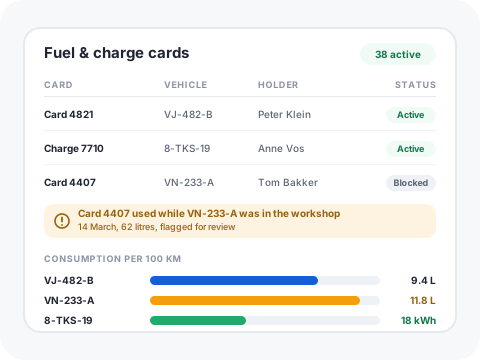
Yes. Cards are registered against the vehicle and the driver, blocked as part of offboarding and of the end-of-lease return, and their transactions can be imported and matched to the vehicle and the reading. That gives consumption per vehicle in litres or kWh per 100 km, cost per kilometre, and the outliers worth asking about.
Yes, and it is the reason the module exists in a facility platform. Equipment is measured in running hours rather than kilometres and carries its own statutory inspection certificates, so those are first-class fields rather than a workaround in a vehicle record.
The portal shows one lessor's leased vehicles and ends when the contract does. It has nothing on your owned vans, your equipment, a second leasing company, your fines or your damage history. This register is lessor-neutral, covers the whole estate and keeps the history after the lease ends.
Yes. Keep it for location and driving behaviour, and use Gfacility for the register, the expiry dates, the work orders and the costs. Odometer readings can be imported so service intervals stay accurate without anyone mailing round for readings.
The spreadsheet is usually the import. Columns become fields, one row becomes one asset, and the dates you were tracking by eye become watched dates with an owner. Most customers are live in a week, and the first thing they see is how many deadlines were already inside 30 days.
Three ways, and you can mix them: entered by the driver or technician on the record, imported from a fuel or telematics export, or captured when a work order is closed. Service intervals and contracted mileage are then measured against the real reading.
Yes. Inspection intervals differ per country, APK in the Netherlands, MOT in the UK and HU in Germany among them, so the inspection date is held per asset with its own rule and reminder rather than assuming one national schedule for the whole fleet.
Book a discovery call and we will map your vehicles and equipment onto the register, including the dates you are tracking by hand today.
Schedule discovery call