
Release Notes
2026 - Q3
Release notes for 2026 Q3: automations, pages, projects, floor maps and desk booking, analytics, maintenance plans, forms, deliveries, email to ticket and API changes.
Updated Oct 22, 2026
This is our largest release so far. Below you will find what changed in each module.
A new look and feel
The whole application has been aligned with a refreshed design, including a renewed navigation, so the product looks and moves consistently from one module to the next.
- Individual display settings: Each user can set their own preferences without affecting anyone else, including the theme, a dark mode, the text size and the row height.
- Guided tours: In-product tours have been added to help everyone find their way around the new layout and settings, so the change is easy to pick up.
Grouping in lists
A long overview no longer has to read as one flat page of rows. Every module listing can be split into sections by any column, so the list opens in the structure you work in.
- Group by any column: Pick the column from its header menu or from the menu on the view tab. It is available on tickets, tasks, assets, configuration items, knowledge base articles, bookings, visitors, services, product requests, finance, users and products.
- Several levels at once: A list can be grouped on more than one level, for example by status and then by the person it is assigned to, with each level opening a heading of its own.
- By day and by time of day: A date column opens a heading per day, and the booking, catering, visitor and service listings can group on the time of day, so every delivery at 12:30 stands together whatever the date.
- Personal, until you save it: Your grouping is yours, like the view type, and it follows you to your other devices. Save the layout and it becomes the grouping everyone gets on that view.
- Quiet headings: A heading shows the value the way the list already shows it, in the colour the status or the priority already carries, so the list keeps its rhythm. Grouping applies to the list and tree views; kanban, timeline and pivot are unchanged.
Search
Finding things is faster, and it is now one search instead of several: one place for every record, every action and every setting.
- One search across every record: Find tickets, tasks, assets and other records from one place and open them in context. It has a normal keyword mode and an AI mode where you can ask in your own words.
- Actions, settings and how-tos as well: The same search reaches every action in the system, so you can create an object, open a setting or find a how-to article from the search bar without knowing where it lives.
- Preset quick filters: A lightning icon offers preset searches, for example a ticket by its id or a search scoped to a persona. They are context aware, so they take the module you are in into account.
- Quick tags: Type a field straight into the search bar, like
id= 10ortitle=, to filter inline as you type, without opening a panel. - Advanced search: Narrow a search with per-field filters and operators (equals, on or before, and so on), added from a filter panel and shown as chips you can adjust.
- Export or search further: The results of a record search can be exported, or searched again to narrow them down without starting over.
Automations
Automations are the next level up from the separate rule engines the platform used to have. One rule listens for a trigger and runs one or more actions, and the range of both is far wider than in the rules it succeeds, which makes it the engine much of the rest of this release builds on.
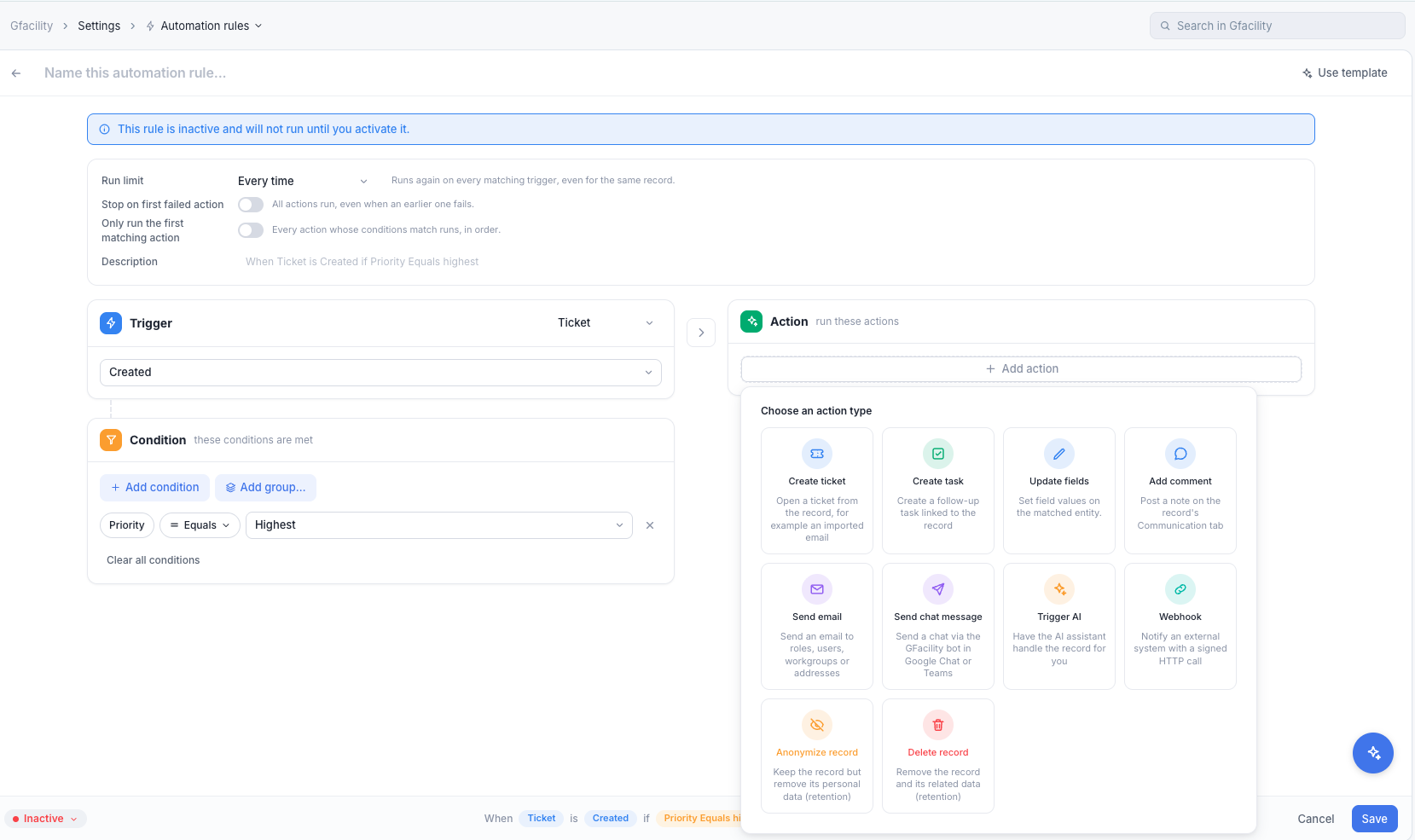
- Trigger on anything: A rule fires when a record is created, updated, deleted or changes status, and it can watch any field for any change, gated by any set of conditions.
- A wide range of actions: Update any field (including assignees, workgroups and watchers), set a price, send an email, post a chat message, add a comment, create a task or a ticket, call a webhook, or hand the record to the AI assistant. For data retention a rule can also anonymise the record, keeping it but stripping its personal data, or delete it outright.
- Send a text message: Next to an email and a chat message, a rule can send an SMS to the people it selects, with values from the record filled in. It reaches the people an email does not reach in time, and every message sent is recorded on the record’s history.
- Across related records: An action can target a related record, so a rule on a reservation can act on its tasks.
- Calculated dates: A date condition or value can be resolved when the rule runs, for example “24 hours before the start”.
- Exclusive ladder: Each action in a rule can carry its own conditions, and on an exclusive rule only the first action whose conditions pass runs, so one rule can behave like an if / else-if chain instead of firing every action.
- Run limits and failure handling: A rule can run every time its trigger matches or only once per record, and you decide whether the remaining actions still run when one of them fails.
- Templates and a safe start: A new rule can start from a template, stays inactive until you activate it, and describes itself in plain language (“when ticket is created if priority equals highest”) so you can check it reads the way you meant.
- Run history: Every run is recorded per rule and pruned automatically, so you can see exactly what fired and why.
Compared with the old setup, where each kind of rule lived in its own screen and did one thing, this is a single engine with, in practice, an enormous range of what you can trigger on and what you can make happen.
Use cases
Six complete processes, each written out as a step list with its diagram, ready to rebuild in your own tenant:
Pages
Until now each user had a single homepage. Pages replace it: you can build several pages, each tailored to a role or a purpose, and your existing homepage is converted to a page automatically so nothing is lost.
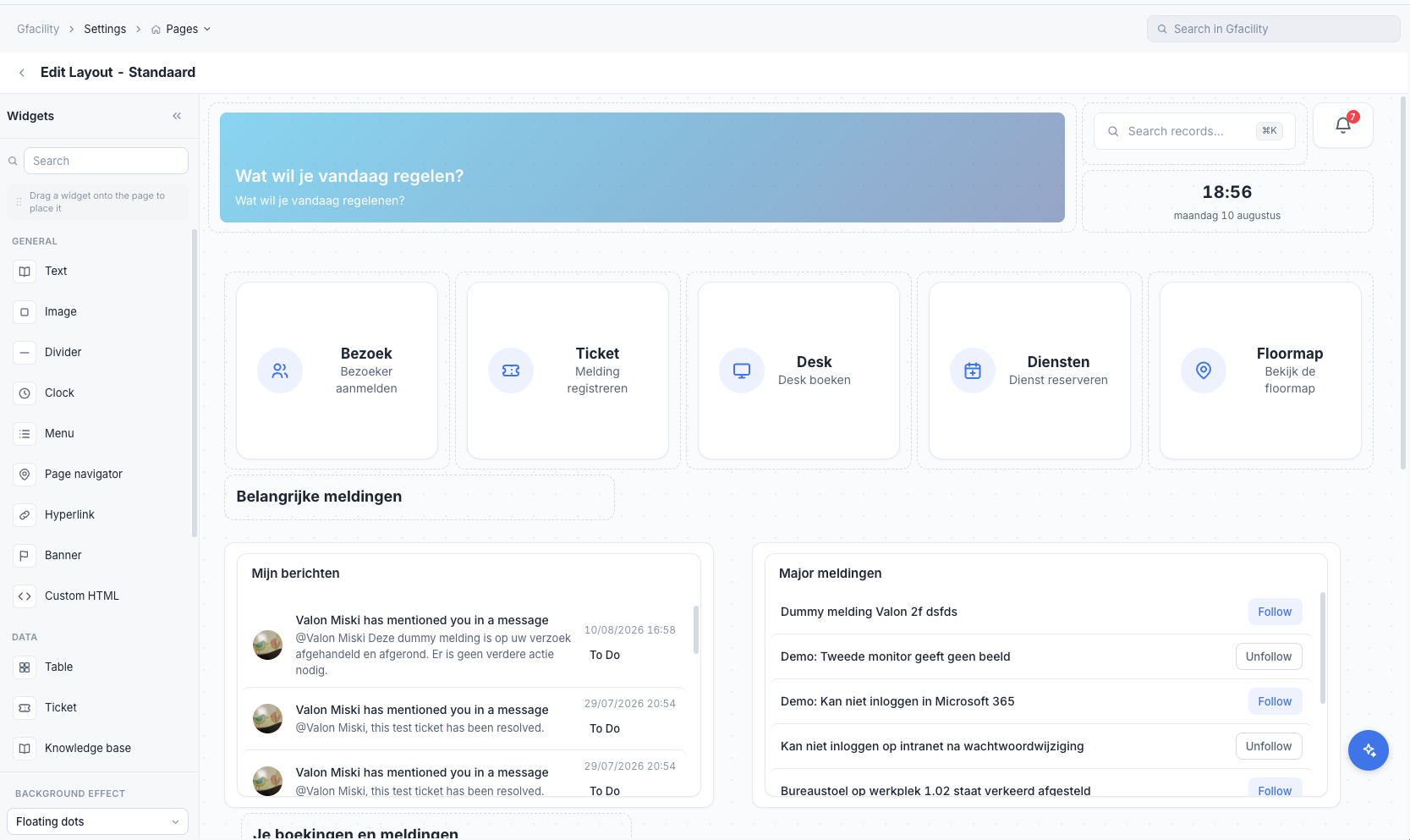
- Multiple pages: Build as many pages as you need instead of a single homepage. For example, a workplace-insights page, a service-desk page and a simpler page for end users, each showing only the information that audience needs. The possibilities are effectively endless.
- A new page editor: Build a page by dragging widgets from a panel onto a live canvas and placing them where you want them, so what you arrange is what your users get. A page can also carry a background effect of its own.
- More widgets: A wider set than before: text, images, dividers, a clock, menus, a page navigator, hyperlinks and banners, plus data widgets for tables, tickets and knowledge base articles.
- Fully custom pages: When the standard widgets are not enough, a custom HTML widget lets you build the page entirely to your own design, so a page can be tailored completely if you need it to be.
- Duplicate: A page can be duplicated as the starting point for the next one.
- Pin and default: A page can be pinned to the navigation and a default page can be set.
- Per-user pages: With the new permissions you can let users build and edit their own pages.
Projects
A new module for planned work that is bigger than a ticket or a task, such as a move, an event or a roll-out. A project holds activities in columns you define, and you share it with the people who work on it.
- Activities in your own columns: Text, numbers, dates, people, choices, workflow statuses, locations and more. An activity can have sub-activities, be a milestone, wait for another activity or repeat, and carries its own notes, files and history.
- List, board, timeline and calendar: Each project has saved views that its members share. On the timeline you drag activities to new dates and draw dependencies between them.
- My activities: Everything assigned to you across all projects in one place, in the same four views, including activities that belong to no project.
- Portfolios, status and workload: A portfolio follows several projects with their status, progress, budget and a timeline. A status update (on track, at risk, off track, on hold, complete) sets the project’s status, and the workload view weighs each person’s open estimates per week against a capacity.
- Shared per project: Invite people or groups to view and comment, to edit, or as admin. Someone who only watches an activity sees just that activity.
- Templates: Start blank, from a built-in starter such as event planning, purchase requests or an issue log, or from a project you saved as a template, whose dates move to the start date you pick.
- Forms and automations: A project form adds or updates an activity, and an add form can be shared through an open link, so anyone with the link can add an activity without an account. Automations act on activities, for example to remind the assignees the day before an activity is due, and a rule on another module can add an activity or link its record to a project.
- Part of the platform: Projects and activities show up in search, in analytics and as widgets on pages, and a ticket, task, asset, booking or location shows the projects it is linked to.
Integrations & sign in
Setting up integrations and sign-in used to be something we did for you. It now lives in the product: from one workspace you manage your own integrations, create service accounts, and configure single sign on and the other login settings yourself.
- Self-service integrations: Connect, configure and manage integrations from the solution itself, including a custom integration for a system we do not ship a standard connector for.
- Service accounts: Create and manage your own service accounts, with the editable name separated from the displayed name.
- Sign in and SSO: Manage single sign on, Microsoft sign in and manual login per company, and decide which methods are allowed. More than one Microsoft tenant can be connected, with one leading tenant for room sync.
- Health status: A status shows at a glance whether an integration is connected and working and whether it has the access it needs, so you can catch a problem before a user runs into it.
Knowledge base
As more of the platform runs on AI, the knowledge base matters more than ever: an AI assistant, and your own people, can only answer as well as the articles behind them. This release extends the knowledge base so you can keep those articles sharp and see where they fall short.
- Smarter search: Article search now ranks results by relevance and matches on the title, description, tags and classifications, handling plural and inflected wordings, so the right article surfaces even when the phrasing differs. Results can be filtered by classification.
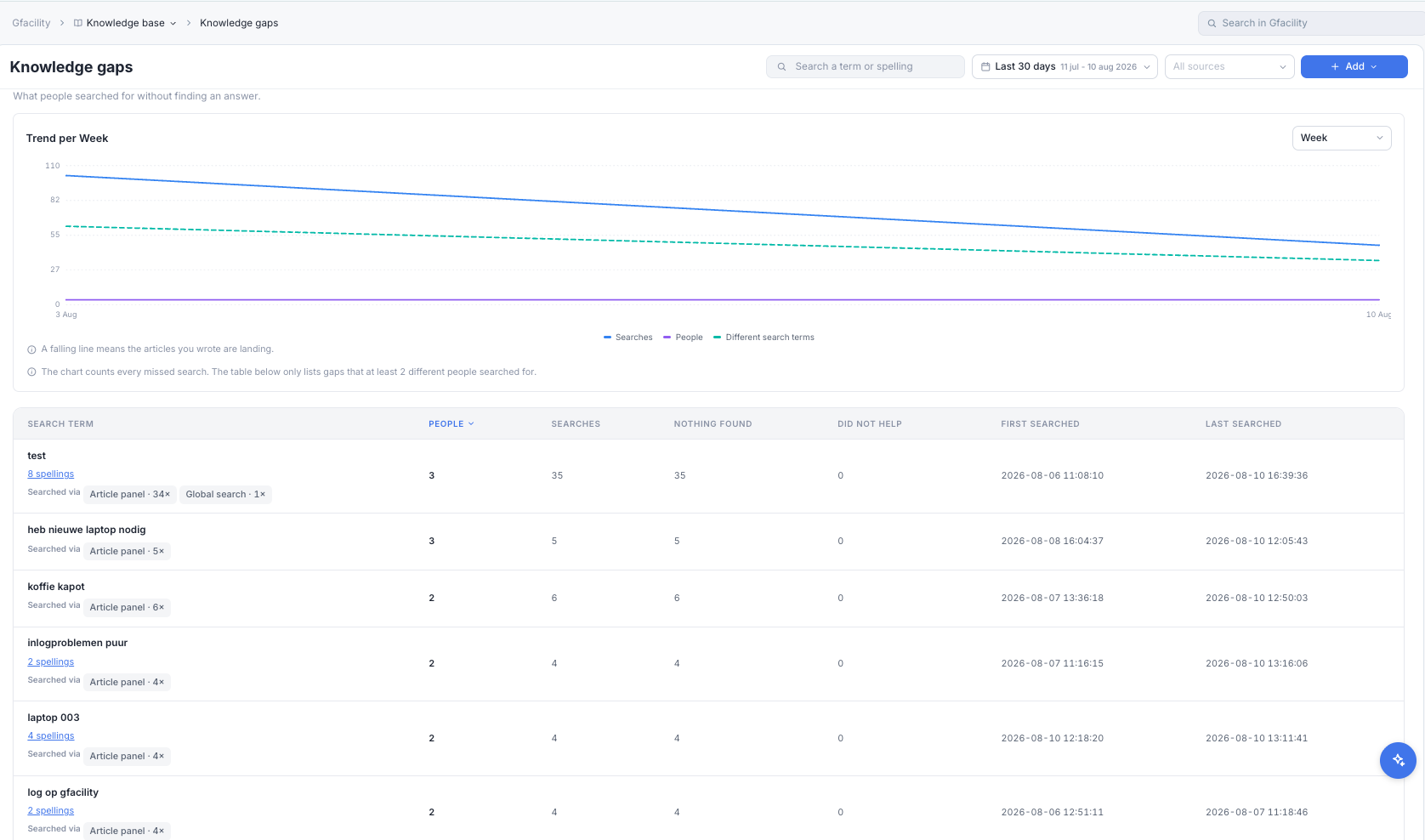
- Knowledge gaps report: Searches that returned nothing useful are recorded, separating a search that found nothing at all from one whose result did not help, with spelling variants of the same question merged into one gap and ranked by how many people hit it. Each gap shows where the search came from, the article panel or the global search, and a trend per day, week, month, quarter or year shows whether the articles you wrote are landing. It is, in effect, your to-do list of articles to write.
- Article feedback: A reader can rate an article, and the feedback is summarised per article, so you can see what is landing and what needs work.
- Usage insight: Article usage is available as listing columns, so you can see which articles carry the load.
Floor maps & desk booking
The biggest visual change in this release: the platform gets a floor map of every floor, and a desk becomes something you can book on it. Rooms and desks show a live status for the time you are looking at, in the booking form, on a wall-mounted kiosk and on the map itself.
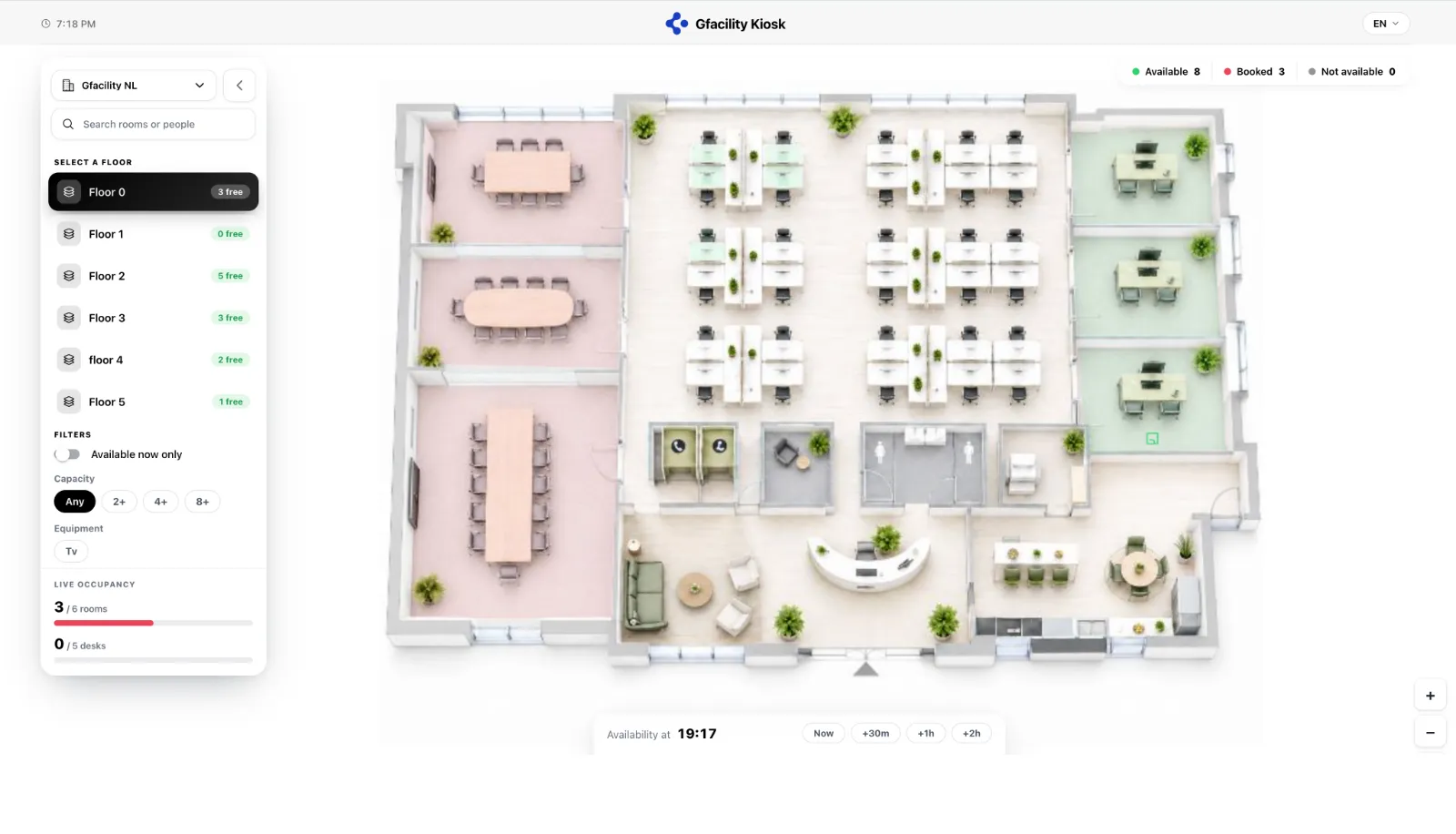
- Floor maps: Draw a plan per floor with room zones, and place desks and other objects on it, linked to their existing records. Each room and desk shows a live status for the chosen time (green free, red occupied, blue selected), with capacity, equipment and the next booking on hover.
- Book from the map: A floor map view sits alongside the list in the booking form. Click a free tile and the booking fills in, honouring the same rules, restrictions and opening hours as everywhere else.
- Desk booking: A desk is now a bookable object next to rooms, with a type (fixed, flex or focus), capacity, equipment and a zone. Reserve one for a full or part day, which opens the door to neighbourhood booking and occupancy insight.
- Floor map kiosk: The same map runs full screen on a wall-mounted tablet or display in the lobby and on every floor. Pick a building and a floor and every room and desk is colour-coded live, with running totals, filters for availability, capacity and equipment, and a time slider, so anyone walking up can see what is free and find their way without signing in.
Workplace
Beyond the map, the rest of the booking experience is brought together too: recurring reservations handled natively, availability moved into reusable rules, and a long list of refinements to how a booking is made and charged.
- Recurring reservations: A series is handled natively instead of relying on the calendar provider. It can be edited as a whole series or per occurrence, and moves, exceptions and cancellations are reconciled with Microsoft rather than duplicated.
- Availability rules: Availability moves out of the individual item into reusable rules. A resource can carry several rules at once, each scoped to specific user groups, with its own minimum and maximum advance time, plus rules for when no location is set and for external rooms.
- Booking templates: An administrator can shape the booking form per template, including custom fields on the booking itself, grouped into custom sections and tabs of their own, plus per-template finance labels and booking-date options defined on the template.
- Outlook add-in and Chrome extension: The Outlook add-in and the Chrome extension for Google Workspace have been updated to follow the web app’s way of working. Settings assigned on the booking template now apply there as well, and when more than one booking template is available, you first choose the template and then make the booking.
- Setup and breakdown time: A room can carry a setup and breakdown buffer, counted as occupied time so adjacent bookings cannot collide with prep or cleanup, with a per-booking override.
- Signage release per type: Each reservation type controls whether a booking auto-releases when no one checks in, so a planned blockade or maintenance booking is not freed up halfway through.
- Reservation source and no-show: Every booking records where it was made (web, mobile, Outlook, Google, signage, kiosk or integration) and is flagged as a no-show when it ends with no check-in, with a configurable grace period.
- Mobile app: Reservations can be managed on the go from the mobile app, with the booking form, availability, recurrence, services and check-in.
- Multiple images: A room or space can hold several images instead of one.
- Hourly pricing: An hourly room uses the room price as its rate, with billing set to dynamic; the separate charge configuration is gone.
- Defect reporting: A defect can be reported straight from the signage.
- Eco score: A product can carry an eco score, available as a column and a filter in overviews.
- Catalogue order: The catalogue order can be set, so the lower-impact options can be shown first.
Analytics
A new analytics module turns operational data into curated dashboards, built around the questions managers actually ask rather than a blank chart canvas.
- Curated KPIs across modules: Ready-made KPIs for tickets, tasks, bookings, assets and configuration items, such as open backlog, time to closure, SLA breaches, overdue tasks, room occupancy and no-show rate.
- Time in status: A duration layer reads the change log to measure how long a record sat in each status, ageing included, so “how long did this wait” becomes a reportable number.
- Benchmarks: Compare a KPI against a previous period, another team or building, or an industry benchmark, and mark your own custom KPIs.
- Richer widgets: KPI cards, sparklines, trend and comparison charts and a heatmap, plus the custom HTML widget, to build a page around them.
- Validation: Dimension combinations are validated, so an invalid one is reported instead of failing at run time.
Ticketing & tasks
Ticketing and tasks gain a way to raise tickets straight from email, a way to raise a linked follow-up record straight from a ticket, and tasks become easier to relate to one another.
- Inbound email channels: An inbound email channel receives mail on its own address, so your automations can act on incoming mail, for example by creating a ticket. Each channel has its own address and token, only accepts mail from known or authenticated senders when you require it, and is rate-limited per hour to keep a mailbox loop from flooding the queue.
- Template-driven intake: When an automation raises a ticket from an incoming email, it does so from a chosen ticket template, filling the template’s own fields and taking sensible defaults from the sender where a field is derived from the requester.
- Reply threading: A reply to a notification mail is threaded back onto the record it came from, for every entity rather than tickets alone.
- Create a follow-up record from a ticket: A Create button in the ticket header raises the record the ticket calls for and links the two together: a Change that resolves it, a Problem that causes it, a task on it, or another ticket that is related to it. What the menu offers follows the ticket’s own type, so an Incident can raise a Change and a Problem, and a Service Request or a Problem can raise a Change. It lists only what you are allowed to create and what an active template exists for.
- Prefilled from the ticket it came from: The new record opens on a template of that type, skipping the template step when there is only one, with the title, description, classification, location and organisation of the source ticket copied over behind a switch you can turn off. Values the chosen template fixes or derives itself are left to the template, and both records list each other under Linked tickets as soon as you save.
- Task dependencies and linking: A task can wait for another, and tasks can be linked between records, with child tasks visible from the parent.
- Full task popup: The task side panel is replaced by a full popup that holds all of the task’s information in one place.
- Inline editing: Task listings support inline editing, so you can change values straight from the list without opening the task.
- Custom fields on tasks: A task template can carry questions of its own, set up in the same question builder as the other templates. The fields show on the task and on its create form, and an automation that creates a task can fill them in, calculated dates included.
- A template that knows what is missing: Creating a task from a template checks the template first. When everything can be filled in, one click creates the task. When something required is still open, a field derived from a parent record that is not there, or a required question with no default, the create form opens prefilled, with the gaps marked and Save held back until they are answered.
- Your recent templates first: The Add menu lists the five templates you used most recently, with a search box above them, and keeps the rest of the catalogue behind a single entry, so the one you need is a click away.
Deliveries
Parcels that arrive at reception become deliveries: a new kind of ticket with its own workflow, so you can see at a glance which parcels are still waiting and who collected what.
- A ticket class of its own: A ticket template with the class Deliveries registers parcels with their own reference (DLV) and workflow: registered, awaiting pickup, picked up or cancelled.
- Scan the label: Take a photo of the parcel label from the create form; on a phone or tablet the camera opens straight away. The recipient is recognised and filled in with their organisation, the carrier and the tracking number go into the description, and the photo is attached to the delivery.
- You stay in control: Nothing is saved on its own. When the recipient is not certain you choose from up to five likely colleagues, and when the label cannot be read you fill in the delivery yourself.
Custom templates
Ticket templates can now carry a form design of your own, so the create form matches how your organisation asks its questions. Nothing changes until you switch a template over; every template keeps the standard layout by default.
- Design the create form per template: Next to the question builder, a template now has a custom form mode: you author a layout in HTML and it becomes the whole create dialog, with your own headings, help text, columns and width.
- Fields stay real fields: You place the template’s fields and sections as slots in the layout, at full or half width. Validation, required fields, permissions and default values keep working exactly as in the standard form; the layout only decides placement and looks.
- Live preview: The builder shows the form next to the editor as you work, in light mode, dark mode and your own theme.
- Let AI write the layout: The instructions pane bundles your brief, the build rules and the fields you pick into one prompt you copy into any AI assistant, then you paste the result back in.
- Knowledge base inside the form: Suggested articles can render inside the form itself, so a matching answer appears while the requester is still typing.
- Switch back at any time: Turning the custom form off returns the template to the standard layout. The same builder is also available for asset, configuration item and knowledge base templates.
Forms
A new building block for the moment you need something from someone about one record: a visitor who still has to give their licence plate, a requester who has to approve, an engineer who has to confirm the job is done. You build a form once, send it, and the answers are written straight back onto the record, so nobody retypes a reply from an inbox.
- One form per kind of record: A form applies to tickets, tasks, assets, configuration items, bookings, visitors, booking products or booking services, and can show that record’s fields, its custom fields and questions of your own.
- A builder that works like a questionnaire: Add text, fields, uploads, decisions and comments, drag them into order and group them into sections. For every answer you decide where it goes: into the field, appended to the description, added to the conversation, or kept on the submission only.
- Decisions that set the status: A decision block offers up to six buttons, and each can set a status or a status role such as “approve” or “reject”, resolved on the record’s own workflow. The change carries the same history as one made in the app, and an option a particular record cannot take is greyed out rather than hidden.
- Send by email, SMS or link: Send a form from the record’s new Forms tab to a role (the requester, the assignee, the visitor, the organizer) or to any address, by email or by SMS, or copy a working link to share anywhere else. Colleagues can also fill a form in for someone from inside the app.
- No account needed: Recipients fill the form in on a public page in their own language, with your logo, colours and header image. For anything sensitive, the form can ask for a code sent by email before it opens; a recipient who is already signed in skips the code.
- Your own layout: Like custom templates, a form can carry a layout of your own in HTML, with an AI prompt to help you write it, and a preview in a new tab shows it exactly as the recipient will see it.
- See who still has to respond: Every form becomes a status column on its listing (sent, opened, submitted, expired, revoked), so you can filter on everyone who has not submitted yet. The column is in the exports too.
- Forms on a booking: A form can be about the booking itself, sent to the organizer, the host or the attendees, and can fill in the booking’s own custom fields. The booking popup has a Forms tab of its own.
- Ratings in a form: A rating block asks one of your rating questions, in stars or as a comment. The answers are saved as ordinary ratings on the record, on the booking for a booking or visitor form, so they count in your rating overviews, also when the respondent has no account.
- Show only if: A block can be shown only when the record meets conditions, set with the same condition builder as automations. A hidden question is never required.
- A safer email code: The recipient now types the address the form was sent to, and the code is only sent when it matches. An answer confirmed this way is recorded under the colleague’s own name, or the visitor’s name, instead of Integration.
- Works with automations: A rule can send a form with its Send email and Send SMS actions, and the new Form submitted trigger acts on the answer, including the decision that was chosen. An update rule can also watch a form’s status, for example to follow up when a form expires.
Set it up
Building a form, sending it and following up on the answers, step by step: Forms.
AI
The Gfacility AI gets more powerful and more open.
- Multiple providers side by side: Run more than one AI provider in the same environment, instead of being tied to a single one.
- Newer models: Support for the latest models, with a context window up to 1,000,000 tokens for much larger inputs.
- More usage control: Additional options to assign and cap AI usage across the company and per user.
- MCP, both ways: Connect external tools to the Gfacility AI over MCP, and use Gfacility itself as a tool inside external AI assistants.
Inspections & maintenance
Facility operations gain structured building inspections and recurring maintenance plans, which together feed the multi-year maintenance plan.
- Inspections: A structured inspection with defect registration, including detail fields per defect.
- Condition scores: Defects are scored against NEN 2767 and the condition is held on the configuration item, so the current state of an asset is visible outside the inspection.
- Maintenance measures: Recorded measures form the basis for multi-year maintenance planning.
- Maintenance plans: Recurring preventive maintenance for assets and configuration items. A plan picks its records by hand or by condition, repeats on a date pattern, on a meter reading or on a measured condition, and generates the tasks that belong to each occurrence. Blackout windows keep planned work out of the periods you close off.
- Long-term plan (MJOP): The multi-year forecast is built from the recorded measures and the maintenance plans, and covers assets as well as configuration items.
Space forecasting
Capture how space is used over time and model what happens next, from your own data rather than a spreadsheet.
- Snapshots: Space and headcount are recorded over time, giving a real baseline to plan against.
- Scenarios: Model a move, growth or reorganisation from line items per team or department, compared against the recorded snapshots.
My office days
Teams and individuals plan which days they are in the office.
- Office day rules: A team publishes a recurring in-office pattern, materialised into concrete days ahead of time.
- Attendance: Attendance is predicted from the pattern and confirmed by the person, with actual presence recorded per day.
- Calendar sync: Optional per user, so office days appear in Outlook or Google Calendar as a work location.
Organisation-scoped role
Access to a record used to be close to binary. Either someone held one of the three narrow roles on it (creator, assigned to, or watcher), or they had no role and whatever “no role” grants applied across their whole organisation scope. For most customers the step from nothing to everything is too wide, so this release adds a layer in between.
- A configurable role: An administrator defines what the role may do (read, edit, close, reassign, adjust financials and so on) rather than picking from a fixed set.
- Bound to the profile: The role binds to two fields on the user. Their primary organisation is where it applies by default, and organisations with access lists the further organisations they can reach, which the role can either extend to or stay out of.
- Product-wide: One configuration covers every object that carries permissions today: reservations, assets, configuration items, tickets, tasks and services.
- Alongside the existing roles: Creator, assigned to, watcher and no role all stay exactly as they are; this sits next to them rather than replacing them.
A typical use is a service coordinator who has to pick up and reassign any ticket inside one organisation, but should stay out of the other organisations.
Others
- Pinned columns: A column can be pinned, so it stays in view while you scroll the rest of a listing sideways.
- View settings in one place: Choosing your columns and switching the view type have moved out of the action bar into the view settings, so everything that shapes how a listing looks now sits together.
- Permissions: Group permissions can be compared side by side.
- Translations: Configuration data such as statuses, types and labels can be translated from the interface, with import, export and a count per language.
- Templates: Templates can be compared side by side.
- Guided tours: In-product tours are tracked per user, so a tour is not shown twice.
- Attachments: Attachments now show thumbnails.
- Announcements: Announcement banners that a user can dismiss.
- Scheduler: Live updates over websockets and configurable timeline columns.
API changes
This release adds a lot of surface and retires some. If you consume the API directly, review the breaking changes first.
Removed endpoints:
- Per-module history endpoints are replaced by one.
POST {task}/history,GET {ticket}/history,POST {asset}/history,POST {product}/history,POST {knowledgebase}/history, the configuration-itemPOST /history,POST {deletedEvent}/history,POST {deletedEvent}/history/usersandGET meeting/{event}/historyare all removed. UseGET change-loginstead, gated bycan:changeLog.list. - Per-model availability is replaced.
GETandPATCH availability-rules/{modelType}/{modelId}are removed in favour of the availability-rule resource below. - The AI usage endpoints are replaced.
GET ai/usage,GET ai/{type}/{id}/usageandGET ai/{type}/{id}/usage-listare removed in favour ofai/usage/systemandai/billing/usagebelow. - Dashboard sections are no longer their own resource. The
dashboards/templates/sectionsresource is removed; a page’s sections are managed through the page itself.
Changed permissions (same URL, different gate):
- Dashboard templates move from one blanket permission to per-record gates:
dashboardTemplate.listbecomesdashboardTemplate.browseon the index anddashboardTemplate.view,templateon show, and update, duplicate and delete now bind the template (...update,template,...duplicate,template,...delete,template). Duplicate no longer usescreate. - The floor map editor moves from
can:locations.updatetocan:viewMap, and a newGET locations/booking-floorsis gated bycan:viewBookingFloors. - Restriction rule duplicate now needs
can:restrictionRule.duplicate. - Time entries bind the entry itself, so update and delete resolve
can:taskTimeEntry.update,task,timeEntry(and the ticket equivalent) rather than the parent alone. - Custom field tabs, sections and assignments are now gated.
POST,PATCHandDELETEoncustom-fields/tabs,custom-fields/sectionsandcustom-fields/attributes/assignrequirecan:customField.assign; they carried no permission before. - Template sequence now needs
can:template.update,templateonPATCH templates/{template}/sequence, where reordering was previously ungated. - AI context search now needs
can:ai-context.listonGET ai/context/search, where it was previously ungated. - Form submissions now check the module’s form permission on the caller’s role on the record, on top of the record’s own right:
{module}-form-readto list and view,-createto fill in, send, resend and copy a link,-updateto submit and upload, and-deleteto revoke.
Changed fields:
- Recurrence renamed. On events,
recurrence_typebecomesrecurrence_external_type(the Microsoft or Google series role), alongside new native recurrence fields. Clients readingrecurrence_typemust switch. - Location charge fields removed.
charge_typeandcharge_hoursare gone; an hourly room’s rate is thepricefield with dynamic billing. - Location image replaced. The single
imagefield gives way to the attachments collection, so a location can carry several images; read the primary one from the display attachment. - Product billing is an enum (
fixed|dynamic), values outside that set are normalised tofixed, and a neweco_scorefield is available. - Availability advance moves. The per-item
before/afterfields now live on the availability rule as minimum and maximum advance time. - Dashboard templates gain
created_byandallow_duplicate. - Error messages stay translated (i18n), so parse error codes rather than English strings.
Updated endpoints:
- List responses can now omit columns per user. Several modules gained field-level read permissions (
{module}-organization-read,{module}-organizer-read,{module}-visitor-past-read,{module}-visitor-future-read,{module}-inspection-read), and list endpoints strip those columns for users who lack them. Do not assume a column is present just because it was last release. - Aggregate columns are filterable. Columns built from a grouped join (workgroups, assignees, classifications, tags and similar) can now be filtered directly. Filtering them previously either failed or silently pruned the rows the aggregate summed over, so a record with several values collapsed to the one you filtered on; those filters now match the record and still return the full set.
- New filterable and sortable columns were added across the existing list endpoints (events, configuration items, locations, products, assets, knowledge base, bookings, catering, finance, groups, organizations and filters), so saved views and grid filters have more to work with.
- Listings prune by requested columns. Send the columns you actually display via
visibleColumns[]; a request that asks for everything makes the backend resolve every custom attribute and grouped aggregate on each fetch. - Restriction rules now constrain the route parameter to numeric ids, so a non-numeric id no longer resolves.
- Signage auto-release changed handler.
POST auto-releasenow resolves to the auto-release action rather than the check-out action, matching the per-type release setting described above. The URL is unchanged, the behaviour is not.
New endpoints:
- Automations:
automation-ruleswith full CRUD plus{rule}/toggle,{rule}/test,{rule}/runsand a tenant-wideruns. Actions include set-price and delete-record. - Availability rules: a full resource (
index,name-listing,show,update,duplicate,delete) plus per-model rules (GET/PATCH {modelId}) andDELETE {rule}/{modelType}/{modelId}to unlink one item. - Change log:
GET change-log, the single history feed for every module. - Desk booking:
desk-booking/upcoming,check-in,{bookingRoom}/check-outand{bookingRoom}/extend, plusGET locations/{location}/desk-qr. - Inspections and maintenance:
inspection(CRUD +listing),maintenance-measure(CRUD),mjop/forecastand anexport/inspectionsendpoint. - Space forecasting:
space-forecast/calculate,space-snapshots,space-portfolios,space-collaboration, andspace-scenarioswith CRUD,compare,duplicate,export,accuracyand per-lineupdate/reset. - Office days, teams and presence:
teams(CRUD,mine,invites, join, leave, members,nudge,attendance,insights),attendance-intents(mine,overview,setMine,calendar-opt-in,user),office-day-rules/mineandpresence-events. - AI:
ai/plan(CRUD,tenant-settings,groups, assign to group or user),ai/quota,ai/billing/usageandai/usage/system. - Security:
security/audit-logs,security/blocked-accounts,security/unblockandsecurity/sign-out-all. - Floor kiosk:
floor-kioskwith list, create, show, update and delete. - Knowledge base: gap reporting (
gaps,gaps/trend,gaps/variants, gated by the newknowledgebase.gapspermission),search-miss, plus per-articleusageandfeedback(withfeedback/summary). - Inbound email:
inbound-email-channels(CRUD,name-list,rotate-token,{channel}/emails) accepting token-authenticated mail per channel, rate-limited per hour, for automations to act on. The send-email action can choose its sender address. - Booking templates: per-template
finkeys(list, reorder, update) and customsections, with attribute tabs and sections gated bycan:customField.assign. - Forms:
forms(CRUD,name-list,catalog,in-use,{form}/duplicate,{form}/preview,{form}/fill,{form}/send,{form}/blocks/{block}) gated by the newforms.*permissions, andforms/submissions(show,submit,upload,resend,link,revoke) gated by the rights on the record the submission belongs to. The public fill page has its own token-authenticatedformroutes, rate-limited per minute. - Projects:
projects(CRUD,categories,linked,tasksfor My activities,workload) and per projectrows,columns,views,dependencies,status-updates,linksandfiles, plusexport/projects/{project}/rows; members and watchers take an access level. - Deliveries:
POST ticketing/deliveries/scan-label(a photo or text that was already read, plustemplate_id), gated bycan:ticket.createand limited to 30 scans a minute. - Translations: endpoints to read and write configuration translations, with import, export and per-language counts.
- Feedback and announcements:
nps(eligibility,dismiss,company-settings, store, update) and system announcements with per-user dismissals. - Smaller additions:
catalogue-sort/{type}(get and update),GET {event}/seriesfor series info, andPATCH user/tour-state.