
Release Notes
2026 - Q1
Updated Feb 2, 2026
This release brings a broad set of improvements that strengthen the platform both visually and functionally. We are introducing a fully renewed look & feel, making bookings more flexible with new options and extensions, and improving the way information is displayed and managed. Additionally, search, overviews, and notifications have been refined for better oversight and control, and general technical and performance optimizations have been implemented to make the platform faster and more stable in daily use.
UI & User Experience
General UX Improvements
In previous versions, the navigation bar, settings menu, and parts of the lists were already renewed. In this release, that renewal has been extended to the entire platform. Buttons, tables, and all components are now consistently aligned, creating a coherent and uniform whole.
Homepage
The homepage has been further expanded to make it more flexible and powerful. Building sections and widgets has become easier, with more control over layout, content, and actions, allowing the homepage to be better tailored to the needs of every user.
Key improvements
- Flexible section layout When adding a section, you can now determine how many columns it contains and how the columns are aligned. These settings are available by hovering over the section and selecting the options at the top.
- Expanded widget range New widgets have been added, including banners and the ability to embed Power BI reports. Additionally, extra tables are available for multiple modules, such as CIs, services, and tasks.
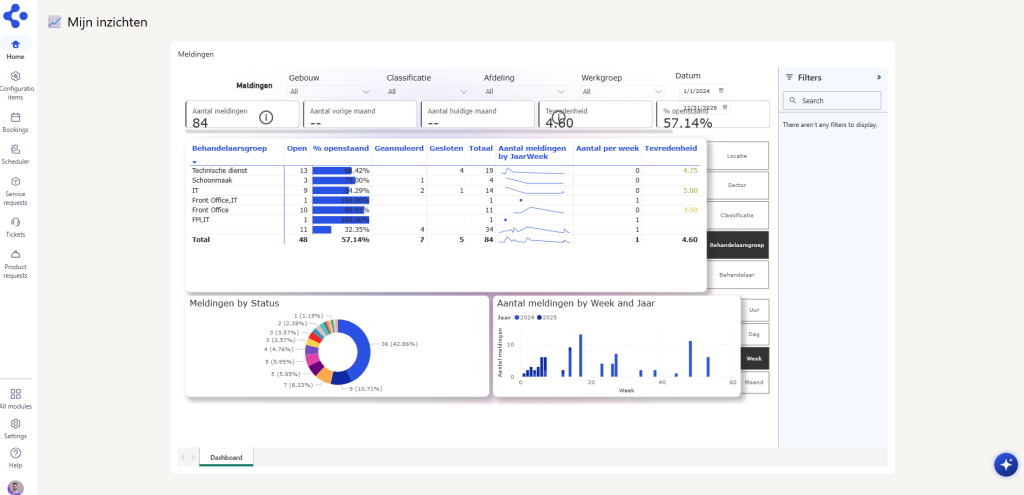
⚠️ Important
When embedding Power BI reports on the homepage, coordination with the local IT or Power BI team is essential. Power BI offers multiple ways to share reports, including public links. This form of sharing is strongly discouraged for security reasons.
The recommended and supported approach is to work with authenticated access, where users can only view reports based on their identity and rights within the organization. This keeps data protected and ensures the setup complies with standard security and compliance guidelines.
- Adjustable widget size You can now easily adjust the size per widget for better layout and readability.
- Improved actions within widgets You can now link actions to ticket templates, for example, which open as a popup within the same screen without loading a new page.
- My Mentions widget The My Mentions widget on the homepage now only shows open mentions. If you want to view all mentions, you can click through via Show all mentions. Additionally, you can now set a status per mention yourself, such as To do, Done, or Replied.
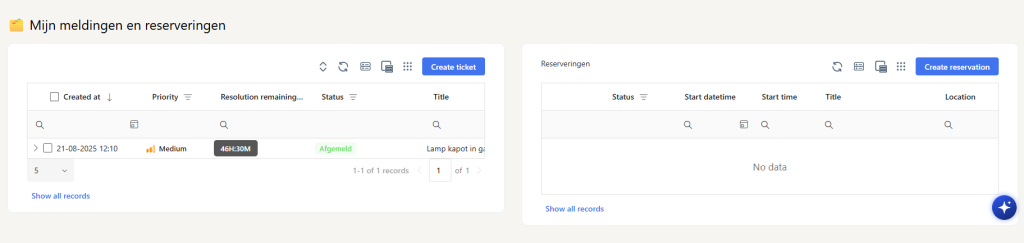
- Improved tables Tables on the homepage have been expanded with extra functionality. You can now create a ticket or make a reservation directly from a table.
ℹ️ Migration impact The current homepage will be automatically migrated during the upgrade. To display it optimally after the upgrade, further fine-tuning is required. These adjustments must be performed manually on UAT and PROD after the upgrade.
Managing multiple records simultaneously
This improvement makes it possible to work more efficiently with multiple records at once. Users can navigate, compare, and perform actions faster without having to open and close items each time.
Key improvements
- Selecting multiple records When you select more than one record, a black action bar appears at the bottom of the screen with options for multi-select.
- Open in tabs Selected records can be opened simultaneously and are displayed as tabs at the bottom of the screen.
- Extra actions available Export and multi-edit options for the selected records are also available from the action bar.
- Available via search This functionality is also available via the search function, as long as you are working within a specific module.
General
This release includes general improvements that make the solution more stable, secure, and future-proof.
- Upgrade to the latest technologies The entire solution now runs on the most recent and stable versions of the technologies used.
- General performance improvements Optimizations have been implemented across the entire solution to further improve performance, speed, and reliability.
- Support for PowerPoint files It is now possible to upload PowerPoint files (PPT) within the solution.
- Adjustable default value for notification type The default value for the notification type can be set.
Template Collections
Until now, when creating new records (such as tickets, assets, or configuration items), all templates were shown in one list, which quickly became cluttered for organizations with many templates. Therefore, we have added template collections: this allows you to logically group templates into clear structures. Multiple hierarchies are possible (e.g., main and sub-collections) and a template can be linked to multiple collections simultaneously, so the same template can be reused in different contexts without duplication.
📂 New Hierarchy
-
Tickets
-
Collection: IT
↳ Hardware (Laptop defective, Monitor replacement) ↳ Software (Password reset, Application crash)
-
Collection: Facility Management
↳ Building & Maintenance (Lighting, Painting) ↳ Cleaning (Extra cleaning, Room dirty)
-
This new structure makes selecting the right template much simpler and keeps the interface organized, even with a large number of templates.
.png)
.png)
ℹ️ Migration impact The impact of this change is minimal. No template collections are created and existing templates remain fully functional. However, the display changes: where templates were previously shown three abreast, they are now displayed underneath each other. Content and functionality remain the same; only the presentation changes slightly.
Bookings
Financial Keys
The settings for financial keys are being further expanded and refined. In the new version, you can determine this even more specifically, depending on the classification or the type of product or service.
💡 Example
- For a booking with catering products, the financial key can be mandatory.
- For a booking with flowers or other non-billable items, it remains optional.
Individual or pooled bookings
Configuration items (CIs) get a new setting that allows you to determine whether they are booked individually or as a pool. This is especially suitable for resources such as parking spaces or bicycles. With pooled bookings, you do not reserve a specific item, but indicate how many units you need, for example, 10 parking spaces. In the planning board, you see how many items are still available per time slot, but not which specific items are booked, because these bookings are not linked to an individual CI.
Main categories in products
The product module is being expanded with support for main categories (e.g., Catering, Flowers). This ensures better findability in both the web application and the plugin.
.png)
Expanded ‘Add’ button
The ‘Add’ button in the booking screen is expanded with three dots (…) for extra input options.
- With a regular click on Add, the item is added directly.
- Via the three dots, a pop-up opens where you can fill in additional details.
.png)
.png)
Edit options visible
When an item has already been added to a booking, this is now displayed more clearly visually.
.png)
Availability rules for products
In the past, only the start time of the event was used for products to determine if a product was available. This could lead to ambiguity in situations such as:
-
The event starts at 08:00
-
The product is only available from 12:00 ➡️ The product was not shown, even if (part of) the event fell within the available period.
In the new version, this logic has been adjusted:
-
Products are now shown as long as their availability falls within the time slots of the event
-
If a product is not available from the start of the event, but is later, it will still be shown
-
A warning will be displayed that the product is only available from, for example, 12:00
This way, the user can make a conscious choice, without relevant options being incorrectly hidden. The same adjusted logic is now also applied to services, so that product and service availability work consistently within reservations and events.
Mobile app
The mobile application receives a major update with a more modern and user-friendly design. In addition, extra modules are added, including tickets, configuration items (CIs), assets, knowledge base, and tasks. Each module offers extensive filter, sort, and display options, allowing users to navigate faster and perform their work more easily, directly via the mobile app.
Knowledge Base
The knowledge base is expanded with a new, intelligent logic that determines which articles are visible and automatically suggested during the creation or viewing of a ticket.
Key improvements
- Multiple classifications per article A knowledge base article can now be linked to multiple classifications.
- New field ‘Group’ (multiselect) Determines for which user groups the article is visible.
- Smart matching during ticket creation The system only suggests the most relevant articles, based on similarity in classification and automatic text analysis.
ℹ️ Migration impact After the upgrade, the new groups field will be empty by default, as this field was not previously available. This field must be filled in both UAT and PROD after the upgrade. If left empty, no knowledge articles will be made available. If a large number of knowledge articles are present, contact can be made for support in filling in the default values more quickly.
Other
Search & Filtering
Search and filtering have been simplified and made more organized so you can find the right information faster and more specifically.
Key improvements
- Date field always mandatory To guarantee consistent and performant results, the date field is now always mandatory.
- Explicitly select filters You now choose which filters you want to use. Not all filters are visible by default, which ensures a clearer overview.
- Fewer fields visible by default Only relevant fields are shown by default, making screens calmer and more organized.
Overviews
Overviews have been adjusted to work more performantly and predictably, with more control over what is displayed.
Key improvements
- Active view required When no active view is selected, no data is shown. This prevents unnecessary load and increases performance.
- Improved performance Due to this adjustment, overviews load faster and more consistently.
- Minimum one overview per group Every group must have at least one overview. When a group has no overview, nothing is displayed until an overview is added.
ℹ️ Migration impact This is an important functional change: groups without assigned filters will no longer see records. Therefore, verify carefully beforehand if all groups have the correct filters to prevent impact. You now choose yourself which filters are visible and active; not all filters are shown by default, which ensures a more organized screen.
Primary image for services
It is now possible to set a primary image for a Service (Configuration Item). This image is used as the visual representation of the CI and replaces the standard placeholder.
How it works:
-
Add one or more images as an attachment to the CI.
-
Hover your mouse over the desired image.
-
Click on the primary icon to mark this image as the primary image.
The selected image is used from that moment on wherever the CI is visually displayed, such as in the reservation overview.
Flexible adjustable timeline and week view in the planning board
The planning board has been expanded with extra flexibility in display. You can now limit the hours of the timeline by setting a from-to selection, so only relevant working hours are visible. Additionally, in the week view, it is possible to determine yourself from which day to which day the planning is shown, for example only a work week instead of a full week. This ensures a more organized planning board and supports more efficient planning.
Expanded product requests overview
Previously, the product requests overview only displayed requests from the catering module. This overview has been expanded to also include product requests submitted via tickets.
Technical
Product API - Migration impact
With the expansion of the product requests overview, the underlying structure has been generalized to support requests originating from multiple sources. Everything within Gfacility will be updated automatically and will continue to function correctly. Power BI reports or custom integrations that use the Products API are outside of our control and cannot be updated automatically by us.
Column mapping
-
event_id → model_id
-
events_description → model_description
-
event_status → model_status
-
event_attachment_count → model_attachment_count
-
event_chats_count → model_chats_count
-
event_start_time → model_start_time
-
event_end_time → model_end_time
-
(new) model_type → ticket / event
Get API’s - Migration impact
All GET APIs have been optimized so that only the data explicitly requested by the frontend is returned in the response. These APIs are heavily used by customers, making this optimization particularly important for performance, stability, and response times.
When retrieving data, a filter is selected first. From now on, only the data that is visible as a column in this filter will be returned. As a result, less information may be returned than before if certain fields are no longer configured as visible columns in the overview.
This optimization applies, among others, to:
-
get tickets
-
get tasks
-
get events
-
get products
-
get services
-
get CI
-
get assets
-
get rooms
Important Customers using custom integrations based on these APIs must explicitly test this change. If certain data is required but no longer returned, it must be added as a column in the relevant overview so that it is included again in the API response.