
Bureau 2.14
Zone fenêtreFavori
Donnez à chaque bâtiment une couche visuelle. Les collègues voient sur un plan interactif quelles salles et quels bureaux sont libres, puis réservent le bon emplacement en un clic, avec les mêmes règles, validations et vérifications de disponibilité qui s'appliquent dans tout Gfacility.
Plan d'étage
Détails
Bureau
D-07
Bureau flexZone flex
Réservé
Équipements
Réservé : D-07, 11:00 - 12:00
Plan d'exemple. Les couleurs indiquent ce qui est réservable sur le créneau choisi, pas qui est assis où.
Du plan à l'étage
Suivez un étage, du plan importé par un administrateur aux chiffres de la fin du mois.
Cartographiez votre étage
Importez un plan, tracez les salles et placez les bureaux. Chaque repère renvoie à une fiche que vous gérez déjà.
Réservez depuis le plan
Les collègues cliquent sur une place libre et le formulaire de réservation se remplit tout seul.
Enregistrez-vous, ou libérez la place
Un enregistrement confirme que le bureau est vraiment utilisé. Sans enregistrement, la place redevient disponible.
Une borne dans le hall
Le même plan en plein écran sur un écran mural : trouver une place libre tient en un coup d'œil.
Des chiffres sans capteurs
Les réservations et les enregistrements font la mesure : vous voyez l'usage réel de l'étage.
L'éditeur de plan
Un administrateur importe un plan par étage, trace les zones de salles et y place bureaux, équipements et points d'intérêt. Chaque repère renvoie à sa fiche existante dans Gfacility, rien n'est créé deux fois.
Éditeur de plan
Siège, étage 2
Fiche liée
ÉquipementMachine à espresso
Un repère renvoie à un équipement, un élément de configuration, un produit ou un point d'intérêt. Chaque fiche n'est placée qu'une seule fois.
Avancement du plan
Étage 2
12 bureaux placés sur 14
Les salles se lient aux fiches de salle que vous avez déjà dans Gfacility, vous ne les recréez donc pas.
Le fond est une image que vous décalquez : importez un jpg, un png ou un svg de l'étage.
Réserver un bureau
Choisissez le bâtiment, le jour et le moment de la journée. Les bureaux que vous utilisez le plus sont déjà en tête de liste, classés selon votre propre historique de réservation. Réservez deux places en une seule fois et attribuez la seconde à un collègue.
Nouvelle réservation de bureau
Réservation pour Peter Klein
Bâtiment
Bureau de Breda
Jour
Demain
Moment de la journée
Suggérés pour vous
Vos favoris et les bureaux que vous réservez souvent arrivent en tête
Bureau 2.14
Zone fenêtreFavori
Bureau 2.31
Zone d'équipe MarketingSouvent utilisé
CDAttribué à Camille Dubois
Bureau 2.18
Zone focusLibre
Bureau 2.22
Zone fenêtreLibre
Réservé
Journée entière, demain. Le second bureau appartient au collègue à qui il est attribué, pas à la personne qui a réservé.
Les salles et les bureaux se réservent de la même façon, avec les mêmes règles, restrictions et flux de validation.
Découvrir la réservation de salles→Gfacility se connecte au Zens Desk Management System : le Smart PuK, un chargeur sans fil intégré au bureau avec un anneau LED et un capteur de présence. L'anneau reste éteint tant qu'un bureau est libre ou occupé, passe à l'orange quand une réservation va commencer, et s'allume en bleu le soir sur les bureaux utilisés dans la journée.
Un anneau LED qui ne s'allume que quand c'est utile
Aucun code couleur à retenir : l'anneau reste éteint tant qu'un bureau est libre et tant que quelqu'un y travaille, le plateau reste donc calme. Il passe à l'orange quand une réservation sur ce bureau va commencer.
Bleu le soir, pour guider le nettoyage
En fin de journée, les bureaux réellement utilisés s'allument en bleu. La tournée de nettoyage suit la lumière au lieu de traiter chaque bureau du plateau.
Check-in automatique par le capteur de présence
Asseyez-vous et le capteur du bureau vous enregistre sur votre réservation. Personne n'oublie le check-in, donc la libération automatique n'annule jamais un bureau réellement utilisé.
Recharge sans fil au même endroit
Le Smart PuK est aussi un chargeur Qi. Posez votre téléphone sur le bureau et il se recharge pendant que vous travaillez, sans câbles sur le bureau.
 Zens est partenaire d'intégration de Gfacility.
Absences
L'enregistrement se fait en scannant le QR code du bureau. Si personne ne scanne, le serveur libère le bureau au bout de trente minutes, pour qu'un bureau resté vide ne reste pas bloqué pour les autres.
Jeudi matin, troisième étage
Deux bureaux, deux scénarios
Confirmé
Bureau 2.14Bureau 2.14
Scannez pour vous enregistrer
Gfacility
Bureau 2.14
Enregistré
09:02
On s'enregistre en scannant le QR code du bureau, ou la réservation passe en enregistré depuis sa fiche. Le plan interactif ne comporte aucun bouton d'enregistrement.
Non confirmé
DisponibleBureau 2.18
Réservé par Camille Rousseau
La réservation n'est pas supprimée. Elle est enregistrée comme sortie et reste dans l'historique : le bureau est de nouveau libre et l'absence reste visible dans les rapports.
Tout se passe côté serveur
La libération est une tâche planifiée dans Gfacility. Personne n'a besoin de garder une application ouverte pour qu'un bureau se libère.
Uniquement là où l'enregistrement est requis
Cela s'applique aux motifs de réservation pour lesquels vous activez l'enregistrement. Toutes les autres réservations ne sont pas concernées.
Partir plus tôt libère le bureau
Enregistrez votre sortie et le bureau redevient disponible pour le reste de la journée, sans que personne ait à attendre la fin d'un délai.
Les bureaux équipés du matériel Zens confirment la présence depuis le bureau lui-même, sans que personne ait à penser au scan.Voir l'intégration Zens→
Dans le hall
Affichez le même plan en plein écran sur une tablette murale. Quiconque s'en approche choisit un bâtiment et un étage, et voit tout l'étage en couleur, en direct, avec le nombre de places libres par étage.
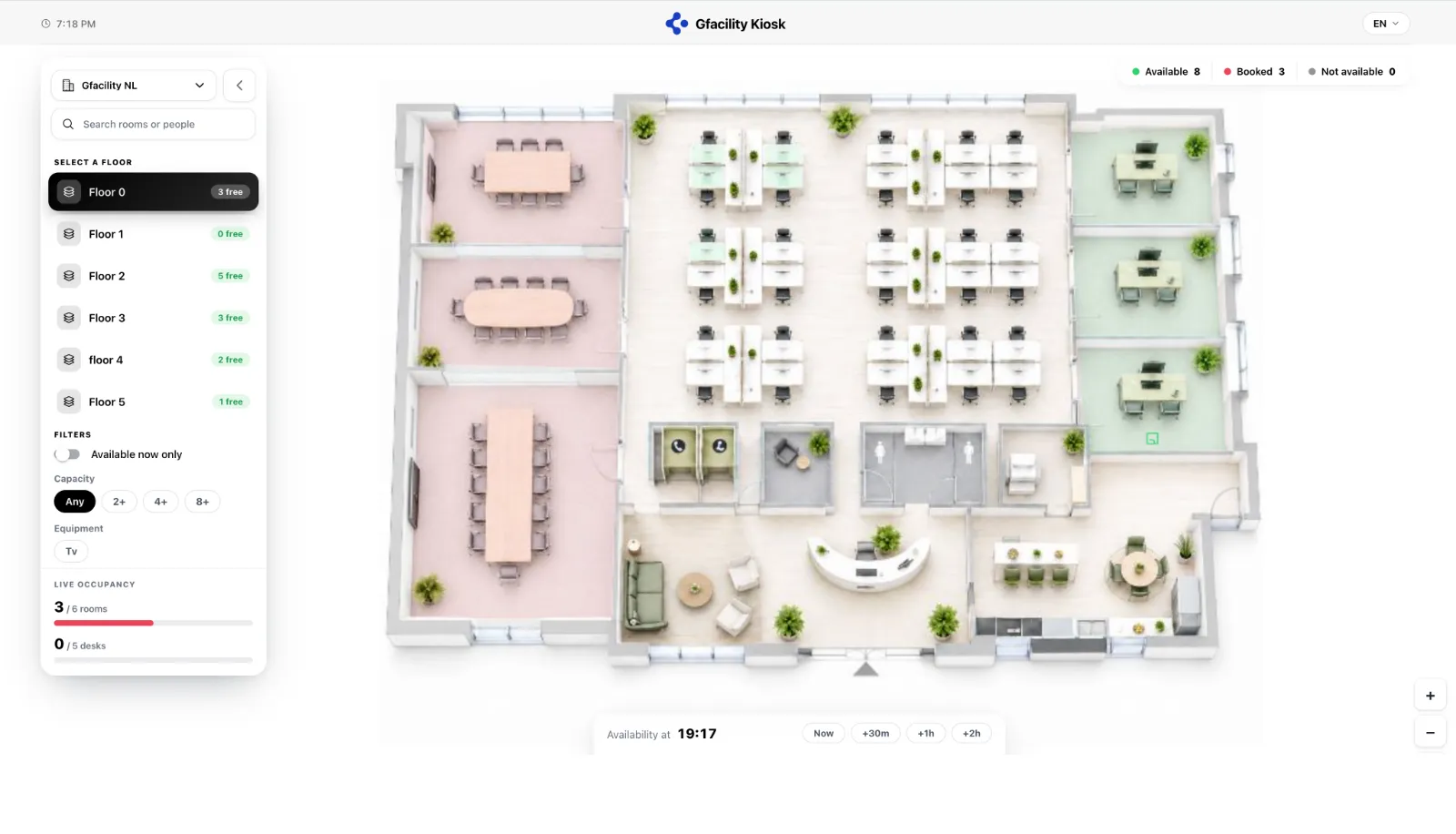
La borne plan d'étage, en plein écran.
Trois états, une couleur chacun
Maintenant, ou un peu plus tard
Le curseur temporel recolore l'étage pour le moment demandé : vous voyez ce qui sera libre après votre prochaine réunion, et pas seulement à l'instant présent.
Sans authentification
La borne montre l'étage à quiconque se tient devant elle. Personne ne saisit de mot de passe sur un écran mural.
Filtrer jusqu'à la bonne place
Les filtres disponible maintenant, capacité et équipements affinent le plan, et le panneau d'occupation en direct garde les totaux des salles et des bureaux sous les yeux.
Trouver la personne, pas seulement le bureau
La borne cherche à la fois dans les salles et dans les personnes, donc un bureau réservé vous mène au collègue qui s'y installe aujourd'hui. Le plan dans le navigateur parle de places, pas de personnes.
Jours de bureau
Un clic suffit pour annoncer votre mardi au bureau. Vous réservez votre bureau dans le même écran, et un clic de plus le ramène chaque mardi.
Votre semaine
Un clic par jour
Posez le jour
Mardi, au bureau
Un bureau avec ça ? Un clic.
Bureau 2.14 réservé
Le même bureau chaque mardi ?
Inscrit dans votre semaine
lun
Télétravail
mar
Au bureau
2.14mer
Au bureau
jeu
Télétravail
ven
Absent
Chaque mardi, le bureau 2.14 revient dans votre semaine : plus rien à organiser le lundi soir.
Présents mardi
Choisissez vos équipes : une seule semaine les affiche toutes, de quoi déplacer un jour là où sont les autres.
Microsoft 365
Heures de travail et emplacement
Mardi
Au bureauBureau de Breda
Gfacility
Le jour déclaré dans Gfacility peut être écrit dans le lieu de travail Microsoft 365 de la personne, utilisateur par utilisateur et avec son accord. C'est un lieu de travail, pas une réunion : rien n'est ajouté à son agenda.
Ce qu'une personne saisit elle-même l'emporte sur toute donnée déduite ailleurs.
Voir comment fonctionne le travail hybride→Analyses
Présence, taux d'occupation des bureaux et jours où les gens viennent vraiment, le tout déduit des réservations et des enregistrements que vous avez déjà.
Découvrez ce que montre Workplace insights→Occupation des bureaux
30 derniers jours, bureau de Breda
Taux de présence
0%
des jours de bureau déclarés
Occupation des bureaux
0%
des bureaux réservables sur une journée moyenne
Jour le plus chargé
Mardi
78% de l'équipe sur site
Présents par jour
41%
78%
66%
72%
29%
lun
mar
mer
jeu
ven
Part de l'équipe dans le bâtiment, en moyenne sur la période.
Les équipes qui se retrouvent
Quelles équipes se retrouvent dans le bâtiment les mêmes jours, d'après les bureaux qu'elles réservent.
Tout vient des réservations et des enregistrements sur les bureaux, donc aucun matériel n'est nécessaire pour obtenir ces chiffres. Les bureaux équipés du matériel Zens les affinent encore, puisqu'ils confirment la présence sur le bureau lui-même, et les données de présence d'un fournisseur peuvent être importées en complément.Voir l'intégration Zens→
Données d'exemple.
Non. Les salles se lient aux fiches de salle que vous avez déjà dans Gfacility, le plan réutilise donc vos données existantes. Les bureaux se créent au fur et à mesure que vous aménagez l'étage, puisque le concept lui-même est nouveau.
Oui. Les bureaux et les salles suivent les mêmes règles de réservation, restrictions, flux de validation et horaires d'ouverture qui s'appliquent dans tout Gfacility, pour que la politique reste cohérente partout où l'on réserve.
Non. La disponibilité, la libération automatique et les analyses reposent toutes sur les réservations et les enregistrements sur les bureaux, donc un plan d'étage fonctionne dès le premier jour sans matériel. Si vous collectez déjà des données de présence, elles peuvent être importées en complément, et le matériel Zens en option ajoute la détection de présence directement sur le bureau.
Si le motif de la réservation exige un enregistrement et que personne ne s'enregistre dans les 30 minutes suivant l'heure de début, le serveur libère automatiquement le bureau et il repasse au vert sur le plan. Une personne qui part plus tôt et enregistre sa sortie libère la place immédiatement.
Sur la borne du plan d'étage à l'accueil, un bureau réservé affiche le nom de la personne qui l'occupe, pour que vous sachiez où vous retrouver. Dans l'application, vous voyez les participants d'une réservation que vous ouvrez sur le plan. Il n'y a pas de recherche par personne sur le plan : vous cherchez une place, pas un collègue.
Non. Vous posez votre jour de bureau et réservez votre bureau dans le même écran, et la récurrence hebdomadaire inscrit ce bureau dans votre rythme, semaine après semaine. La réservation elle-même est créée jour par jour, ce qui permet au plan d'étage de montrer la situation réelle à chaque instant.
Planifiez un échange et nous cartographierons un bâtiment avec vous.
Planifier un échange